
Sami2019
Participant
April 2, 2020
Question

Lasso tool residue when digital painting

  • April 2, 2020
  • 2 replies
  • 834 views

Hello,


I have the following issue with the lasso tool.


Whenever I paint whithin a lasso tool selection it will paint slightly outside the edges of the selection. This always happens with the first color I use and even if I try to erase the whole thing this residue line will remain.


I have not been able to find a solution online, maybe because I´m not wording my problem properly so I´m using the images below. 

If any of you know how to fix this it would be great.


Thank you very much in advance!
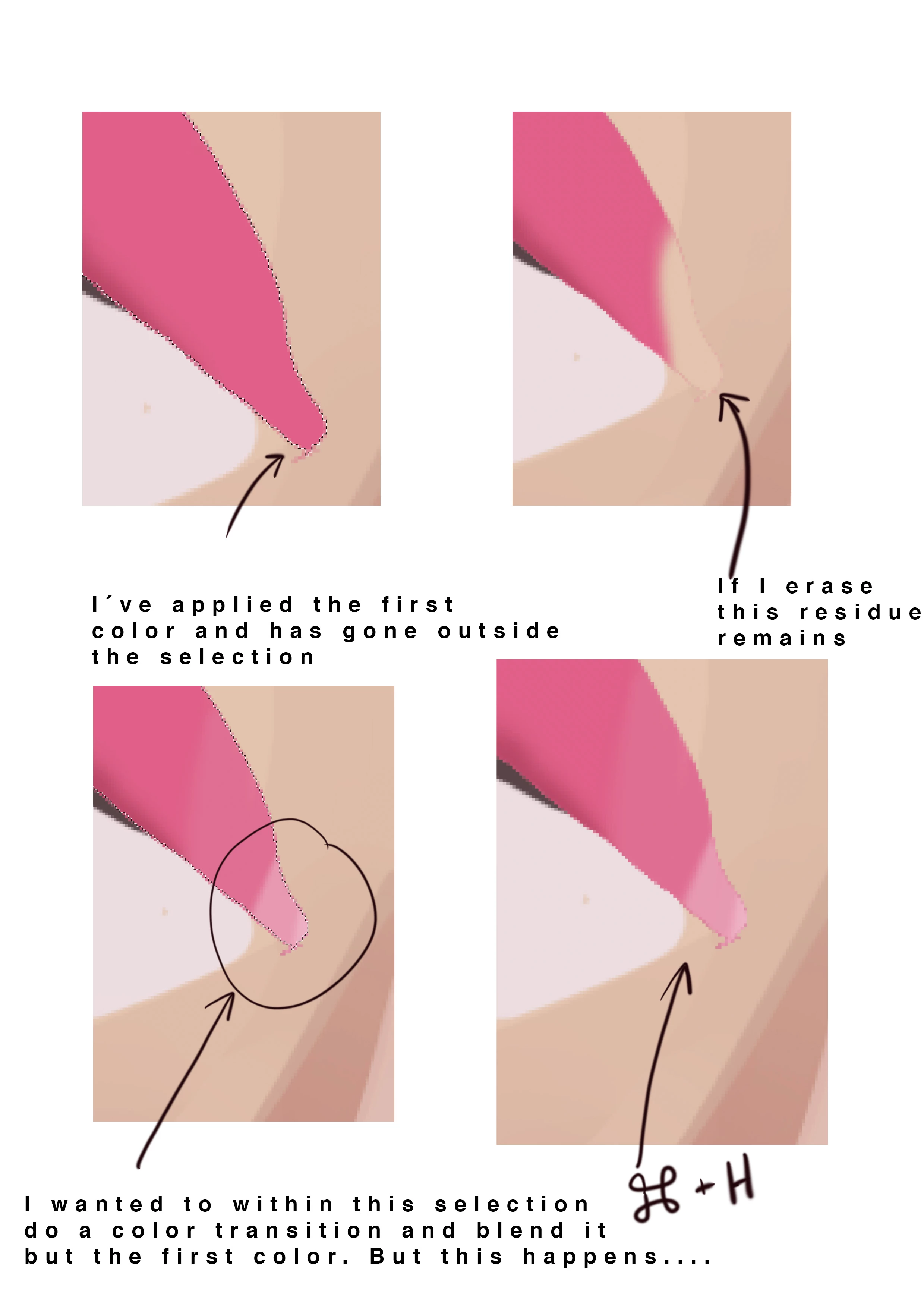
This topic has been closed for replies.

2 replies

c.pfaffenbichler
Community Expert
Community Expert
April 2, 2020

I am not sure if this is actually your problem but a simple illustration of the issue of »Selection edges« would be this: 


• start with  a white background 

• make a feathered Selection 

• fill it with black 

• fill it with white 


Some people would expect the result to be the same white area they started with. 

But that is simply not a reasonable expectation if the Selection was created with Feathering or even Anti-aliasing (except in the case of a pixel aligned rectangular Selection for example). 

Sami2019
Sami2019Author
Participant
April 2, 2020

So... I've tried to do a little test with your suggestions and now I'm way more confused. 

Ive done three circles some with anti alias ticked on some turned off and with different feather percentages and paint now goes way over the edges....... I'm really confused. 


Also, for some strange reason now is painting as if I had lower opacity selected, when I was using a hard edged brush with 100% opacity.


Sami2019
Sami2019Author
Participant
April 2, 2020

Sorry for the typo!!!! (ignore "but the first color")

c.pfaffenbichler
Community Expert
Community Expert
April 2, 2020

Please meaningful screenshots including the pertinent Panels (Toolbox, Options, …). 

What were the Anti-alias and Feather settings? 


The »edge pixels’« semi-selectedness seems to confuse many people. 

Maybe you would be better off painting on Layers with Layer Masks to maintain stronger editability. 

Sami2019
Sami2019Author
Participant
April 2, 2020

Hello C_pfaffenbichler,


Thank you so much for your quick reply!


I attach a screenshot of my whole screen. 


I didnt know about anti-aliasing neither feather settings, so I never played around with those settings... I see now that on that anti-alias is ticked on and feather is 0.