
Participating Frequently
September 20, 2018
Question

latency and freeze in photoshop

  • September 20, 2018
  • 1 reply
  • 308 views

(Google Translate)

Hello.
I use photoshop for digital painting, I am currently on the verssion cc 2018 19.1.5 I am on win 10 and I use a graphics tablet wacom cintiq 13hd.
My pc is new and has a solid configuration (gtx 1080i, i7 8700k, 16g ram)
The problem that I encounter is that randomly (average every 2 minutes) the tool that I use freeze for 10 to 30 seconds. For example I do ctrl + space to zoom and instead of having the magnifying cursor, I stay on the brush cursor and I can not do anything for a while .. sometimes it's while I paint or when I uses alt for the pipette ...
I can not continue in these conditions, my fluidity of work is greatly deteriorated.
I show you a screen of my performance parameters (sorry it's in French)
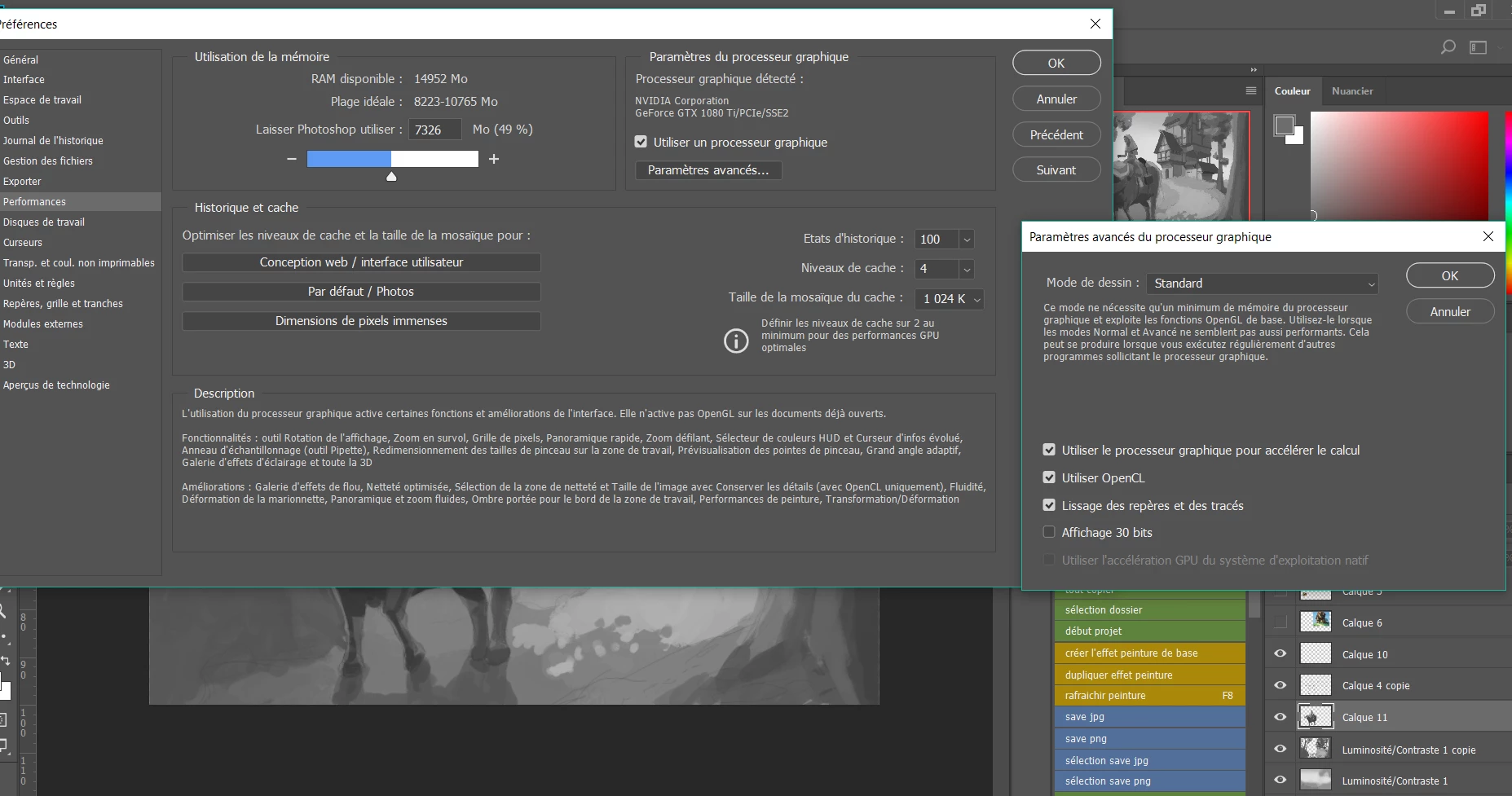

I specify that my pc is not at all in trouble, my cpu remains at 10% of use, the ram at 50% and my graphics card turns quietly staying at 45 ° (Celsius)
I do not know what to do.

    This topic has been closed for replies.

    1 reply

    Trevor.Dennis
    Community Expert
    Community Expert
    September 21, 2018

    Do you just use the one screen?  What I am thinking is that a background process is stealing CPU cycles.  If you open the Task Manager to the Processes tab, and click on CPU so that it lists in order of CPU usage, you might get a clue as to what is happening when you get the freeze.

    Also look at drive usage.  If you only have the one drive, then it will be the one used for Scratch space, so look for a Photoshop Temp file in the root directory of your Scratch drive.  If you have one, and its size is significant, Photoshop might reading or writing to that file.  If you don't have much free space on that drive, then that might slow things down. 

    Also check the Performance tab in Task manager.  This won't tell you the specifics, but if the issue corresponds with a spike in activity, whether on CPU, Drive or anything else, you'll have a clue.

    Try opening Photoshop while holding down the Shift key.  This forces a bare bone open with no third party plug-ins or extensions.  If this makes the issue go away, then try to narrow it down one extension at a time.  Obviously ignore this if you don't use plugins or extensions.

    The Cintiq HD is not uber powerful, and it won't take much to make it stall.  I own a mid spec Cintiq Companion 2, and I don't like using it because it is a bit slow.

    chopsueyAuthor
    Participating Frequently
    September 21, 2018

    Hello , Thank you for taking the time to answer me

    The Cintiq HD is not uber powerful, and it won't take much to make it stall.  I own a mid spec Cintiq Companion 2, and I don't like using it because it is a bit slow.

    I have the impression that there is a misunderstanding. I do not use a tablet companion with built-in computer.

    The 13hd cintiq is only a device with a screen for my pc. My pc at $ 2357 (2000 €) is a high-end pc. I recall my configuration:

    gtx 1080 ti, i7 8700k 3.7ghz, 16gb of ram and a ssd of 1 TB on which everything is installed.
    I think that I am well equipped to hope to use photoshop in optimal conditions.

    Do you just use the one screen?  What I am thinking is that a background process is stealing CPU cycles.  If you open the Task Manager to the Processes tab, and click on CPU so that it lists in order of CPU usage, you might get a clue as to what is happening when you get the freeze.

    Yes I use a second screen, I have 3 screens in all if you count that of the tablet.
    I did not notice anything abnormal in the process during freezes.

    Also look at drive usage.  If you only have the one drive, then it will be the one used for Scratch space, so look for a Photoshop Temp file in the root directory of your Scratch drive.  If you have one, and its size is significant, Photoshop might reading or writing to that file.  If you don't have much free space on that drive, then that might slow things down.

    I found the file and it is 4.5 GB

    Photoshop is installed on a new ssd (window 10 and all my programs too) and I have 490 GB free on it.

    Nothing special about Performance tab during freezes

    Try opening Photoshop while holding down the Shift key.  This forces a bare bone open with no third party plug-ins or extensions.  If this makes the issue go away, then try to narrow it down one extension at a time.  Obviously ignore this if you don't use plugins or extensions.

    I use only the lazy nezumi pro plugin, I tried with your method but it does not change anything.