Participant
October 25, 2018
Answered

Latest Update Crashes Camera Raw on Windows 7

  • October 25, 2018
  • 3 replies
  • 311 views

Any time I try to either use Camera Raw as a filter, or open it from Bridge CC, it crashes both of them.  I can open the Camera Raw dialog, move sliders and do anything I want, but the moment I click either "Done" or "Open", that's it.  It crashes horribly and locks up. 

I have tried re-installing Photoshop and Bridge with AND without importing new preferences.  I've tried it completely fresh and it still does it.  I'm presuming it's because I'm still using Windows 7.  Folks near me using Windows 10 or Apple don't seem to have this issue.  I do have the latest updates for Windows 7 installed also. 

I don't seem to have issues accessing any other new features.  They all seem to work great, with the exception of Camera Raw.

Any advice would be greatly helpful. 
This topic has been closed for replies.
Correct answer

Hi

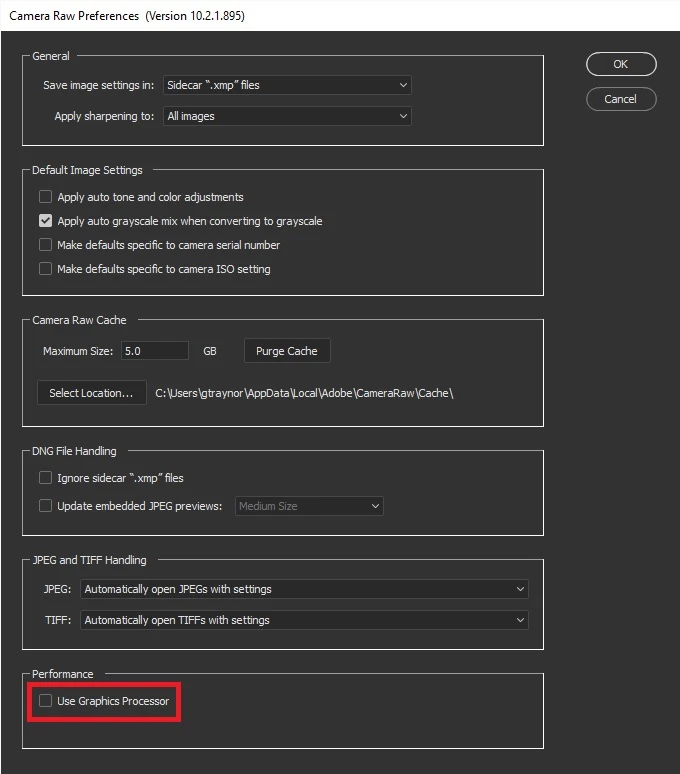
In Photoshop go to Edit > Preferences > Camera Raw and disable "Use Graphics Processor" and restart Photoshop to see if it helps

3 replies

Participant
October 25, 2018

Yes, it worked!  Thank you for your speedy responses.  Works fantastic now!

October 25, 2018

You're welcome

Akash Sharma
Legend
October 25, 2018

Hi jonathonlt1,

Sorry that Camera raw is crashing on your computer after the latest update,

Could you please disable the use of GPU in Camera raw as mentioned in this article Adobe Camera Raw graphics processor (GPU) FAQ and troubleshooting  and let us know if that helps?

Thanks,

Akash

Correct answer
October 25, 2018

Hi

In Photoshop go to Edit > Preferences > Camera Raw and disable "Use Graphics Processor" and restart Photoshop to see if it helps