
December 2, 2019
Answered

Layer blend mode rendering bug Photoshop in 2020

  • December 2, 2019
  • 2 replies
  • 1235 views

Hello,

I'm having trouble with how 2020 renders specific blend modes; for one, I have one layer set to 'hue' with 2% opacity, yet it renders it at 100%; I also have a second layer set to subtract 25% and it also renders at 100%. I have a Geforce GTX 1080 and the latest NVIDIA drivers (at the time of writing). When zooming the image out (to 25%) the image renders correctly.


Using an 8bit or 16bit mode makes no difference.


Anybody else experiencing this or familiar with the issue?
 

{Thread renamed by moderator}
This topic has been closed for replies.
Correct answer D Fosse

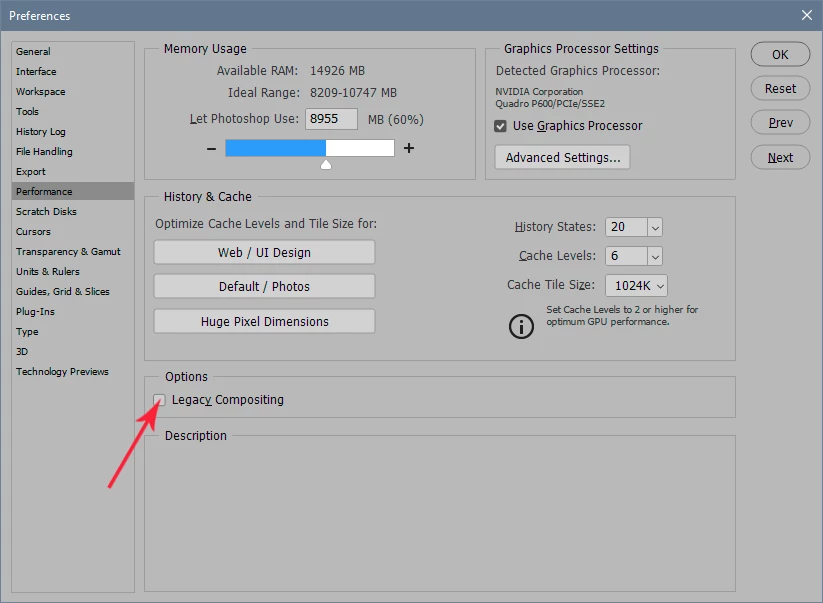
Try to check this:

2 replies

D Fosse
Community Expert
D FosseCommunity ExpertCorrect answer
Community Expert
December 2, 2019

Try to check this:

Sahil.Chawla
Adobe Employee
Adobe Employee
December 2, 2019

Hi there,

Sorry to hear that blending modes are causing color banding in Photoshop 2020, could you please try enabling "Legacy compositing" located in Photoshop's Preferences > Performance, then relaunch Photoshop and let us know if it helps?


Regards,
Sahil

December 3, 2019

Thanks, this indeed fixed the issue! Any schedule for getting it to work with the newer composting method?


Update: With legacy compositing, I have new issues - specific areas (look like large tiles) render darker or lighter, with no apparent reason. Deleting hidden layers on top remove these issues.


Best,

Aki