
Participant
February 29, 2020
Answered

Layer Clipping broken

  • February 29, 2020
  • 3 replies
  • 807 views

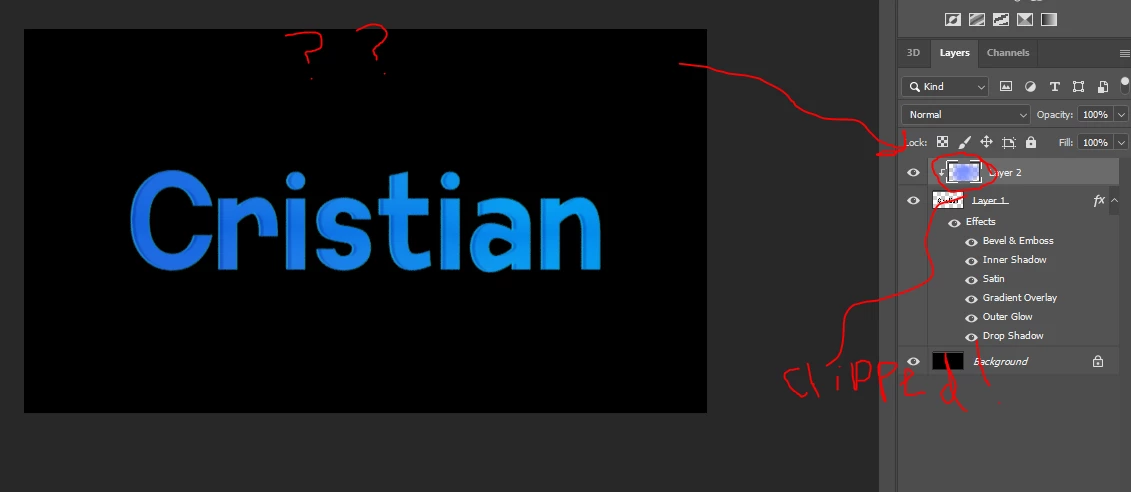
Hi, I am sorta new to photoshop. I was following this tutorial:  https://www.youtube.com/watch? and at 1:28 of the video I can't seem to figure out how to work the layer clip. It allows me to clip the layer, but when I draw nothing appears on the text. I would really appreaciate it if someone could help?


Image included.
This topic has been closed for replies.
Correct answer c.pfaffenbichler

If the Gradient Overlay is at 100% Opacity and has no transparency it can naturally cover the Clipping Masked Layers. 

Unless »Blend Interior Effects as Group« is checked on and »Blend Cipped Layers as Group« is off. 

3 replies

c.pfaffenbichler
Community Expert
c.pfaffenbichlerCommunity ExpertCorrect answer
Community Expert
February 29, 2020

If the Gradient Overlay is at 100% Opacity and has no transparency it can naturally cover the Clipping Masked Layers. 

Unless »Blend Interior Effects as Group« is checked on and »Blend Cipped Layers as Group« is off. 

Participant
February 29, 2020

Hmm. I'll check the opacities and stuff now. Thanks for the help.

February 29, 2020

Hi

What's your foreground and background color set to

Participant
February 29, 2020

Black.

Community Expert
February 29, 2020
Participant
February 29, 2020

Thanks, this was helpful.