kellyj5129480
Participant
February 3, 2018
Question

Layer help! Not sure what I'm doing wrong.
  • February 3, 2018
  • 1 reply
  • 235 views

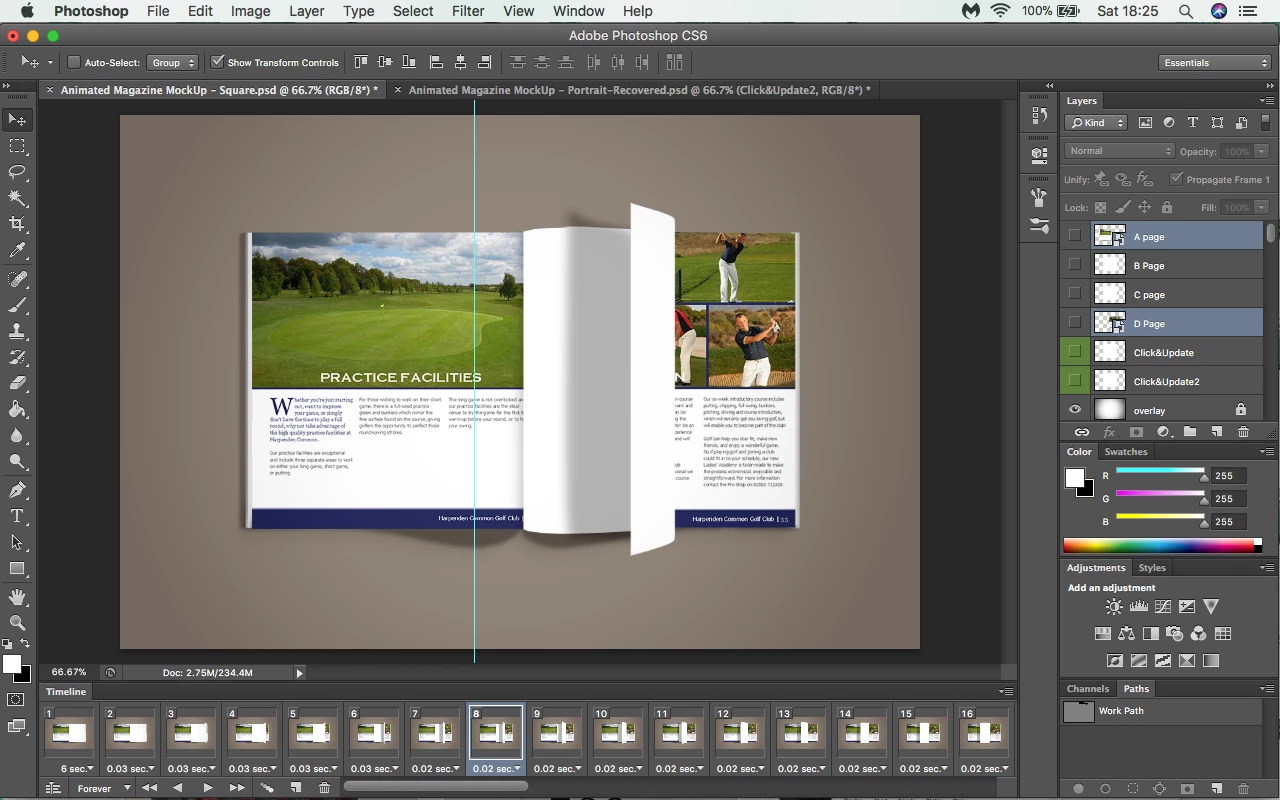
I downloaded this brochure mockup today - but I can't seem to figure out why the turning page isn't showing the design layer. As you can see from the layers panel, I have imported both designs into layers A and D. However B and C are not smart object layers. I would like the middle turning page to have a different design on either side, but I can't work out how to do this! I'm getting really frustrated with myself!

Also, what does 'click & update' on the two green layers? Do I need to edit those layers so show designs (how?).

Thank you

Kelly

Running MacBook Pro 2012 Version 10.13.2

Adobe Creative Suite CS6 Photoshop

This topic has been closed for replies.

1 reply

JJMack
Community Expert
Community Expert
February 3, 2018

You are showing a frame 8 in a Frame animation.  The layers that are visible in the layers palette create that frames composite. So check the layer which to see which layer are set visible for that frame, You need to scroll the layers palette to see if other layers need to be made visible  You have two layer targeted in the layers palette neither is visible in frame 8.

JJMack
kellyj5129480
Participant
February 3, 2018

Hi, thanks for your reply. Yes all correct layers are visible. Layers B and C never appear in the page turning animation. What does the click & update layers mean?

JJMack
Community Expert
Community Expert
February 3, 2018

So  layers A B C and D you do not want visible in frame 8 so what is wrong with frame 8?

JJMack