Answered
Layer is added accidentally
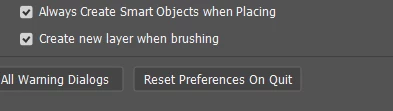
Sometimes, a new layer is created.
For sure, this is happening when the layer is locked. But in the past, this didn't happen. We simply got an error dialog, now, a new layer is created with a different blend mode, and if you don't notice it, the work is getting ruined!!!
How to block this auto layer creation?
Also I google it and cannot find anymore the "Sample All Layers" option for the Brush, where is it???
I am using the latest 2024 version.
 AdChoices