
Participant
February 17, 2017
Answered

Layer mask issue

  • February 17, 2017
  • 2 replies
  • 322 views

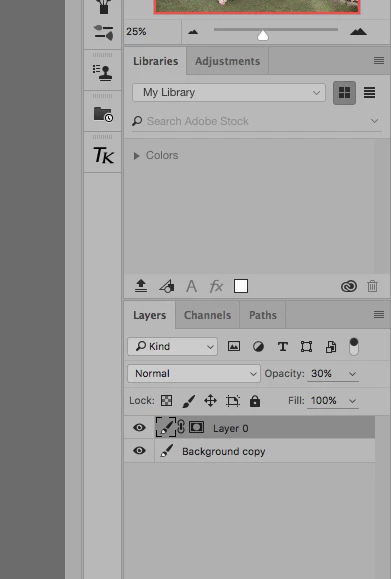
Below is a screen shot of my layers panel. I have been doing photoshop on and off for years and this issue has me baffled.

I can't get the layer mask to go to black or white.  For some reason I have that little paint brush to the right of the eye ball and also that layer mask is filled black with a dot in the middle, so what am I doing wrong here? 
    This topic has been closed for replies.
    Correct answer c.pfaffenbichler

    Try changing the Thumbnail Size in the Panel Options.

    2 replies

    masudr6167678
    Inspiring
    February 17, 2017

    Pleas follow the instruction

    masudr6167678
    Inspiring
    February 17, 2017

    c.pfaffenbichler
    Community Expert
    c.pfaffenbichlerCommunity ExpertCorrect answer
    Community Expert
    February 17, 2017

    Try changing the Thumbnail Size in the Panel Options.