David Neuman
Participant
August 7, 2017
Answered

Layer masks are not visible after update

  • August 7, 2017
  • 3 replies
  • 1729 views

After updating Photoshop to the latest version, layer masks are no longer visible in the mask thumbnail or the image itself. Is anyone else having this problem too?

    This topic has been closed for replies.
    Correct answer davescm

    Hi

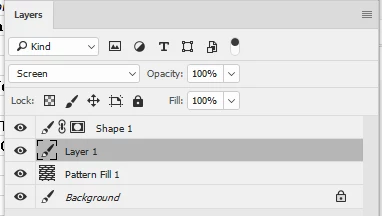
    Are you seeing this :

    Instead of this ?:
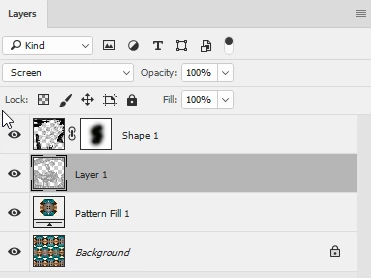
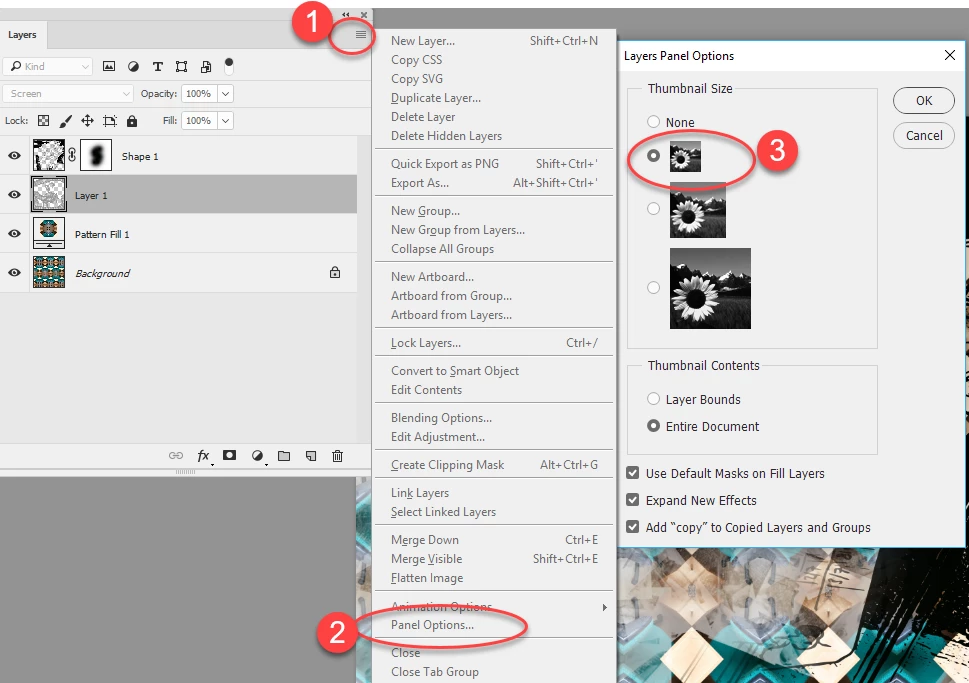
    If so - go to the top right of the layers panel. Click on the square then from the menu choose Panel Options - then thumbnail size
    Dave

    3 replies

    davescm
    Community Expert
    davescmCommunity ExpertCorrect answer
    Community Expert
    August 7, 2017

    Hi

    Are you seeing this :

    Instead of this ?:

    If so - go to the top right of the layers panel. Click on the square then from the menu choose Panel Options - then thumbnail size

    Dave

    Norman Sanders
    Legend
    August 7, 2017

    Does the mask appear in the Channels panel list?

    Did  you save the file as a jpg?

    Sahil.Chawla
    Adobe Employee
    Adobe Employee
    August 7, 2017

    Hi David,

    As layer masks are not visible after Photoshop update, could you please let us know which version of Photoshop are you using and on which operating system?


    Make sure that the blend mode is set to "Normal" and the opacity of the mask is set to "100%".

    Regards,

    Sahil

    David Neuman
    Participant
    October 9, 2017

    This solved the issue. Thanks.