Participant
June 26, 2020
Answered

Layer Moving Image Problem (Mac)

  • June 26, 2020
  • 1 reply
  • 204 views

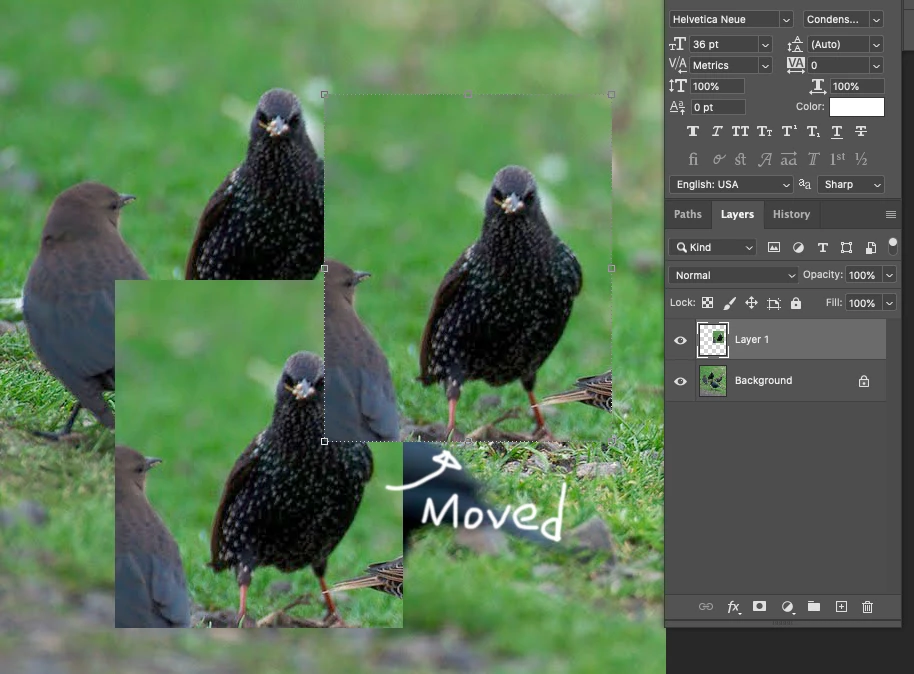
When I cut and paste to a layer and move the image a copy stays behind. When I hide the layers it goes away, but when I move it the same thing happens. I attached a screenshot to help explain. It makes it very difficult to piece together larger images from multiple scans. I have had this trouble since the latest upgrade. 21.2.0
This topic has been closed for replies.
Correct answer CDO622

Update.... 

Problem solved. Found tip by LauraD.  Thank you!!!

Community Beginner ,
Jun 22, 2020

Copy link to clipboard


I found this and it worked right away:

Preferences--> Performance--> Uncheck: Legacy Compositing.

1 reply

CDO622AuthorCorrect answer
Participant
June 26, 2020

Update.... 

Problem solved. Found tip by LauraD.  Thank you!!!

Community Beginner ,
Jun 22, 2020

Copy link to clipboard


I found this and it worked right away:

Preferences--> Performance--> Uncheck: Legacy Compositing.