
Participant
May 3, 2024
Question

Layer style panel on layer menu not working

  • May 3, 2024
  • 2 replies
  • 233 views

Hi there!


I am trying to work with several layers and all the past modifications i've done with fx are not showing up and I can't change them.


I am missing the fx button, see in my screenshot.
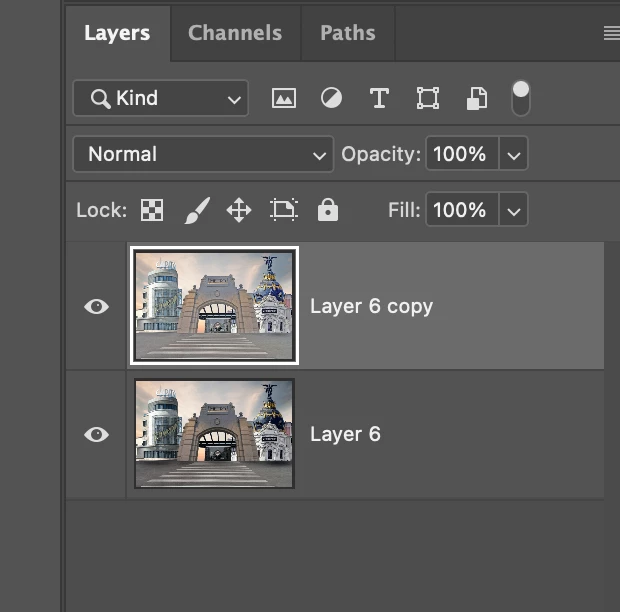
As you can see, I've changed the highlighs and shadows on the top layer, and I want to duplicate it and change the settings, but I can't find the panel. See what I mean on the screenshot below:
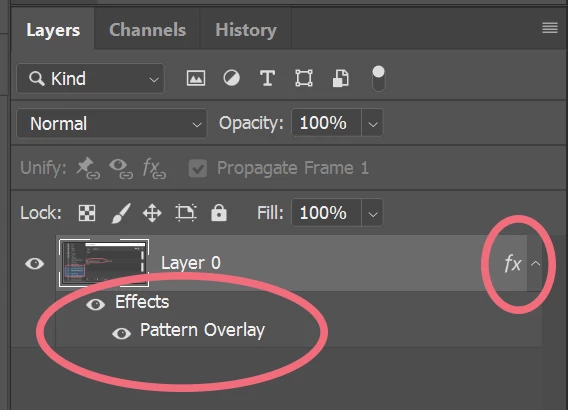
 

i can't find those


Thanks in advanced.


This topic has been closed for replies.

2 replies

Ged_Traynor
Community Expert
Community Expert
May 4, 2024

@Claudia32072463k9zc convert your layer to a smart object before applying the shadow and highlights, that way you can work non-destructively and amend the shadow and highlights should you need

Bojan Živković11378569
Community Expert
Community Expert
May 4, 2024

"As you can see, I've changed the highlighs and shadows on the top layer, and I want to duplicate it and change the settings, but I can't find the panel."


To view the fx and layer effect name beneath a layer, you must apply an effect from the Layer Style dialog. Highlights and Shadows are not included in the Layer Style unless you're referring to the Blend If options, which I see as a slim possibility.


Which command or menu item are you using to adjust Shadows and Highlights?