Inspiring
September 25, 2017
Answered

Layer style unnecessarily applied to multiple layers

  • September 25, 2017
  • 3 replies
  • 4542 views

Hello everyone

While I'm tinkering with blending options in Photoshop 2017.1.1., I occasionally notice changing the layer style of one layer is forcefully applied to other layers of the same type (e.g. text layers). These layers are not even duplicates of the same smart object but they seem somehow linked together...

This has been a vexing problem: I just can't figure out how to isolate the effect of layer style change in one layer!

Someone please tell me a fix for this.

Thank you,

Ead
    Correct answer c.pfaffenbichler

    Hello

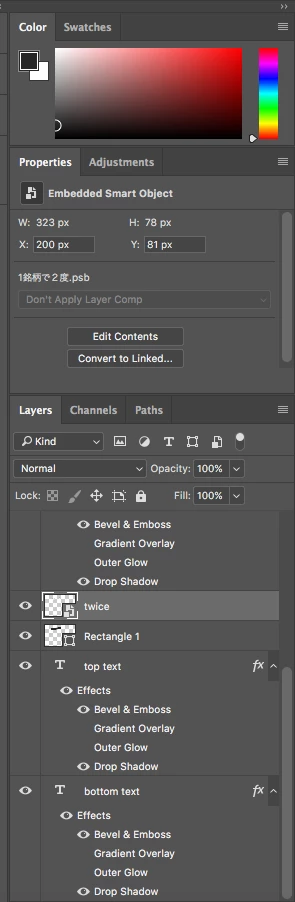
    In the attached screenshot, for example, whenever I change the direction of the bevel effect applied to the 'bottom text' layer gets applied to the 'top text' layer:

    The same happens even if I create a new text layer all over again and apply blending options to it.


    Is »Use Global Light« checked?

    3 replies

    Participant
    October 19, 2020

    YEP- Its Use Gloabl Light... you need to UNCHECK it so that it doesnt apply your chnages to ALL (i.e. Global) layers. That for the tip!

    EadigAuthor
    Inspiring
    September 25, 2017

    I found a workaround - the only way to isolate the buggy layer style change was to transform the layer into a smart object so any blending options made to it is not forcefully applied to other layers.

    c.pfaffenbichler
    Community Expert
    Community Expert
    September 25, 2017

    Once again: Could you please post a screenshot with the pertinent Panels (Layers, Channels, Options Bar, …) visible?

    EadigAuthor
    Inspiring
    September 26, 2017

    Hello

    In the attached screenshot, for example, whenever I change the direction of the bevel effect applied to the 'bottom text' layer gets applied to the 'top text' layer:

    The same happens even if I create a new text layer all over again and apply blending options to it.

    c.pfaffenbichler
    Community Expert
    Community Expert
    September 25, 2017

    Could you please post a screenshot with the pertinent Panels (Layers, Channels, Options Bar, …) visible?