
Known Participant
January 9, 2021
Answered

Layers flattened automatically

  • January 9, 2021
  • 3 replies
  • 2100 views

I started a collage yesterday which contained several layers. I wasn't finished with my work and saved it. When I returned today to complete my work all of the layers were flattened into one layer. Is this typical behavior of Photoshop? Is there anything that I could be doing to prevent this in the future? Thank you.
This topic has been closed for replies.
Correct answer Norman Sanders

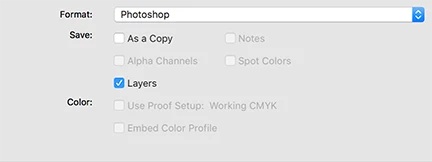
When you Save As >  Format: Photoshiop (psd) file, confirm that Layers is chcked 

3 replies

Participant
February 23, 2024

Im having this issue WHILE USING PHOTOSHOP. Its so frustratiung. Am I hitting a keyboard shortcut on accident?

Norman Sanders
Norman SandersCorrect answer
Legend
January 9, 2021

When you Save As >  Format: Photoshiop (psd) file, confirm that Layers is chcked 

Known Participant
January 9, 2021

Thank you, Norman! You and Dave provided solid help. I appreciate it.

Dave

davescm
Community Expert
Community Expert
January 9, 2021

In what format did you save (jpeg and png do not support layers)

If you used a format that does support layers (PSD/TIFF/PSB) check that "layers" is ticked in the save dialogue.


Dave


Known Participant
January 9, 2021

Thank you, Dave! I am a PS Newbie and, thus, still on the lower end of the learning curve. I also noticed that when I open a photo (or in this case, a collage) from LR, I am given 3 options. I had been checking to "Edit a Copy with LR Adjustments." When I did that, the result was a flattened collage. When I selected "Edit a Copy" or "Edit Original," the result was my collage with the layers intact. I guess this is a part of my learning the relationship between LR and PS, too. Again, thank you. Your reply was helpful.

Dave