Known Participant
January 20, 2018
Answered

Lazy Nezumi vs Photoshop Smoothing?

  • January 20, 2018
  • 6 replies
  • 19172 views

So somebody recently recommended Lazy Nezumi Pro to take my Photoshop/other program art to the next level...I was curious, with the Photoshop smoothing setting, is it really worth it? I'm mostly a 3D artist, in ZBrush and 3DSMax, but if a one time payment of $35 can bring my 2D skills up to par, that would be excellent...
    This topic has been closed for replies.
    Correct answer davescm

    https://forums.adobe.com/people/boo+radley+2013  wrote

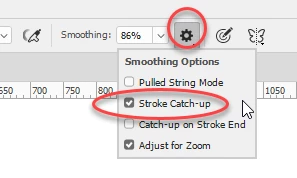
    In Photoshop, the line never seems to 'catch up'.

    If I draw a line, and then stop, the line never fully reaches the cursor. It seems to stop a few millimeters behind.

    Is this a setting I'm missing?

    Hi

    Have you checked Stroke Catch-up in brush smoothing options?

    Dave

    6 replies

    P.M.B
    Legend
    February 23, 2018

    Lazy Nazumi also can be used with nearly any program.  There is a dedicated plugin for Photoshop but it can also be used in Flash, Animate, Illustrator, After Effects, MS Paint, Krita, Gimp, TwistedBrush, ZBrush, 3D-Coat, Sculptris, Paint Tool SAI, MyPaint, Paint.NET, Open Canvas, ArtRage, Sketchbook, Inkscape, Mari, Manga/Clip Studio, Sketchup, Toon Boom, TVPaint, etc...

    BTW.   Lazy Nazumi is not going going to bring your skills to the next level.  In fact any art teacher worth their salt will tell that depending on a smoothing algorithm for strong lines is actually limiting your drawing skills.   But maybe we have different ideas of what a "skill" is.   I used to stink at math until I bought a calculator...now my my math "skills" rival that of computer.  LOL

    ~Gutterfish
    Inspiring
    January 20, 2018

    Yes, tried that. Problem is, I reverted back to CC2014 for the time being - I'll have to reinstall CC2018 and double check it when I get the chance.

    magical_Skyline0D4A
    Inspiring
    January 20, 2018

    If you use a Wacom tablet + Photoshop, they do not know rivals ... but it also depends on what you want to do exactly.

    Personal opinion of course.

         Regards

    Inspiring
    January 20, 2018

    In Photoshop, the line never seems to 'catch up'.

    If I draw a line, and then stop, the line never fully reaches the cursor. It seems to stop a few millimeters behind.

    Is this a setting I'm missing?

    magical_Skyline0D4A
    Inspiring
    January 20, 2018

    Check this out, may be usefull in your case Optimizing Photoshop Brushes for Use With a Wacom Tablet - YouTube

    JJMack
    Community Expert
    Community Expert
    January 20, 2018

    Lazy Nezumi Pro has many more features than just smoothing look at their video. and animations.

    JJMack
    Inspiring
    January 20, 2018

    I still prefer Lazy Nezumi. There's way more options, settings, and tweaks. It seems to be a little faster as well.