
Question
Levels adjustment output levels sliders
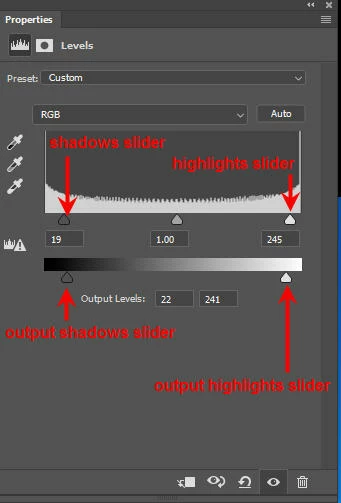
To identify clipped pixels, we hold down the alt/option key and move the highlights or shadows sliders. Let's say my image has truly black pixels (0,0,0). If I move the output shadows slider five units to the right, (0,0,0) is mapped to (5,5,5). Black pixels are mapped to gray. I'm not saying this is a sensible thing to do, but let's say I do it anyway. If I now hold down the alt/option key and click the shadows slider (which is still at 0), I the same pixels as before are shown as clipped. Perhaps Photoshop's interpretation of "clipping" is that pixels do not have meaningful color information, not that they are truly black (or truly white).
Is this a bug or a feature?
 AdChoices