

marcinz
Inspiring
March 11, 2019
Question

Libraries Tab - Nagging window - how to disable for ever?

  • March 11, 2019
  • 1 reply
  • 899 views

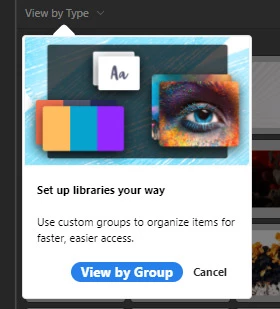
Aftern new launch of photoshop, in the Librarie panel there is ALWAYS opened popup, nagging to view by Group,

How to disable it, hide it, delete it or whatever? I just want id GONE.

Hitting Cancel does not work (after new photoshop lauch it is still there)

Hitting Group - I DO NOT WANT to view by group.

Help, anyone?
    This topic has been closed for replies.

    1 reply

    War Unicorn
    Community Expert
    Community Expert
    March 11, 2019

    Mine always disappeared after the initial splash.

    Did you try Edit (Photoshop on Mac) > Preferences > Tools and under Options, uncheck, "Show Rich Tooltips"? Could be related.

    marcinz
    marcinzAuthor
    Inspiring
    March 11, 2019

    After each computer restart it shows again

    Legend
    March 11, 2019

    Yes I hated that too. I finally surrendered and made some groups. That solved it.