Inspiring
August 23, 2021
Answered

Liquify shows current layer in backdrop. (Difficult to see edits properly)

  • August 23, 2021
  • 2 replies
  • 560 views

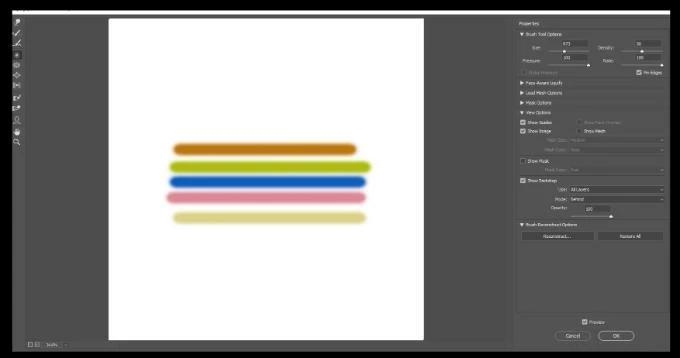
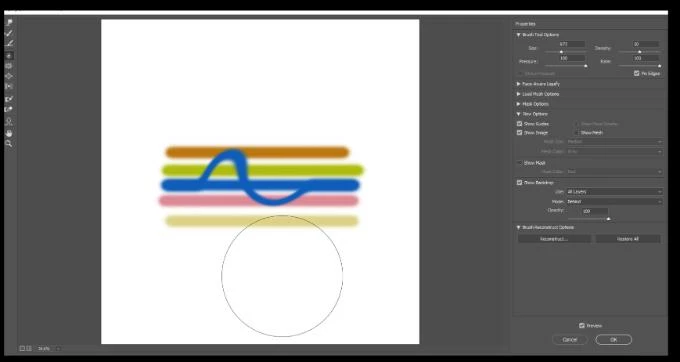
Since last patch i think, the liquify tool shows my current layer im working on as part of the backdrop. So if i edit a layer using liquify, im editing directly over top of a duplicate of the same layer, making it difficult to properly see the end result. Seems like a bug. 

In example shown, i'm editing the blue line layer. I swirled it, but as can be seen, the unedited layer is duplicated underneath, flattened into the backdrop so you still see the blue line as straight underneath it as well as editied (swirled) on top of it.

This topic has been closed for replies.
Correct answer c.pfaffenbichler

Can you turn off »Show Backdrop«? 

Could you please post a screenshot including the Layers Panel? 


Edit: I checked in Photoshop CC 2019 the behaviour appears to be the same. 

2 replies

Kukurykus
Legend
November 26, 2021

Moderator please change the label of this thread to macOS and Windows (and delete my post).

c.pfaffenbichler
Community Expert
c.pfaffenbichlerCommunity ExpertCorrect answer
Community Expert
August 31, 2021

Can you turn off »Show Backdrop«? 

Could you please post a screenshot including the Layers Panel? 


Edit: I checked in Photoshop CC 2019 the behaviour appears to be the same.