Participant
November 23, 2022
Answered

Liquify stop working all of sudden running on ver 24 MacBook

  • November 23, 2022
  • 2 replies
  • 667 views

all works the tools in liquify wont respong to anyting 

This topic has been closed for replies.
Correct answer nicolass53778654

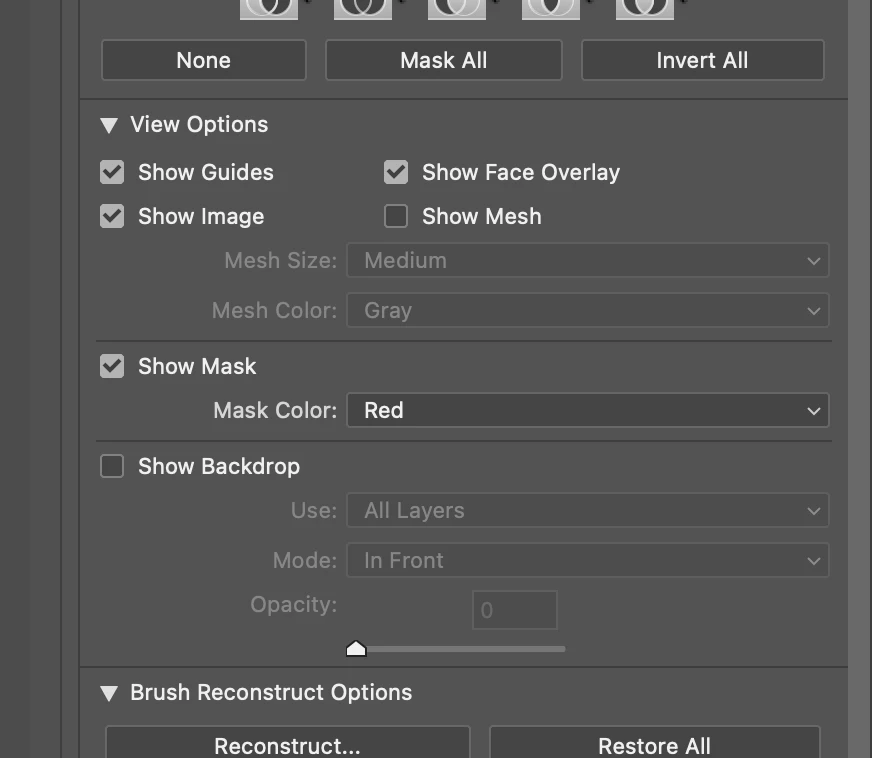
Got it to work last night .  i uncheck the background and it worked. that was the simple solution i did. see below on liquify page of photoshop 2023 ver24
 

2 replies

Kevin Stohlmeyer
Community Expert
Community Expert
November 23, 2022

Can you go to Photoshop Help Menu/System Info and copy/paste deatils here?

It will help determine a solution.

nicolass53778654AuthorCorrect answer
Participant
November 23, 2022

Got it to work last night .  i uncheck the background and it worked. that was the simple solution i did. see below on liquify page of photoshop 2023 ver24


Ranjisha Sengupta
Legend
November 23, 2022

Hi there,


Thanks for reaching out.

Could you please share the macOS version on your computer? Do you see the issue with Liquify filter or other filters as well?

What are your system specifications? You should have 2GB of video memory.

https://helpx.adobe.com/photoshop/system-requirements.html 

Your video card may also not be supported in the new version of Photoshop; check here:

https://helpx.adobe.com/ie/photoshop/kb/troubleshoot-gpu-graphics-card.html


  1. If you restore your preferences using this manual method, does it work https://helpx.adobe.com/photoshop/using/preferences.html#Manually correctly. You can quit Photoshop and return to the Settings folder if that doesn't solve it.
  2. Go to Preferences > Technology Previews... and check "Disable Native Canvas" - then restart Photoshop. Does the problem still occur? Go to Preferences > Performance... and uncheck Use Graphics Processor. Restart Photoshop. Does the problem persist?


We're here to help; let us know how it goes.


Thanks.

Ranjisha