
smithcgl9043167
Inspiring
December 4, 2017
Answered

Load different image after 3 seconds on a palette

  • December 4, 2017
  • 1 reply
  • 1404 views

Hello everyone, a good week for everyone! Is there any way to load a sequence of 4 images.png "one at a time" every 3 seconds in the same coordinate in a palette. Each image would have 3 seconds of display: image1.png: 3seconds later = upload image2.png .... 3 seconds after uploading image3.png / 3 seconds after uploading image4.png My idea here is to improvise a kind of window like: Wait! Processing ...
This topic has been closed for replies.
Correct answer r-bin

r-bin  escreveu

Wow!
Do you want to use your png-progress here?
I'll look a little later.
First, tell me which version of Photoshop and OS. Since UI and its bugs (features) vary from version to version.

There are many steps until you complete the entire task in one script! The code is really too big! But it works very well.

I wait the time it takes! The important thing for me is to understand how to properly add my scripts so they can work on this progress bar example using custom images:

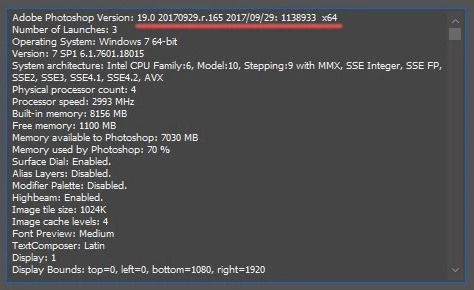
This is the version I am using:


OK. It is advisable to upgrade to version 19.0.1.

Look what happened. It seems to work.

There are 6 modifications in your script. They are labeled as // MODIFICATION !!!!!

One at the beginning, the rest at the very end.

The script a.jsx - Google Drive

P.S. Although all this garbage. It is necessary to use normal progressbar.

1 reply

Legend
December 4, 2017

I did not understand anything, but I can offer.
Open the first image. Turn the layer into a smart object.
Do delay in 3 seconds. Then in the loop do Replace content.on the next image and do a delay

smithcgl9043167
Inspiring
December 4, 2017

Hi  r-bin Is it through images that I communicate better? It would work like a gif.

  function drawButton() {

      this.graphics.drawImage(this.image, 0, 0);

  }

myPrs = new Window('palette', 'Processing image'); 

     myPrs.orientation = 'column'; 

     myPrs.alignment = 'right'; 

     myPrs.ProcessHead  = myPrs.add('statictext',[40,0,260,25], "Batch Processing..."); 


  var logo = File("~/Desktop/imge 1.png");

  var logo = myPrs .add("iconbutton", [0, 0, 0, 0], ScriptUI.newImage(logo), )

  logo.onDraw = drawButton;

  logo.location = [10, 2]


     var LENGTH = 4; 


     myPrs.show(); 


     for(i=0;i<1;i++){ 

         var PrCounter = 0; 

         Function1(); 

     } 


      function Function1(){ 

      // The palette will be displayed the moment some script is executing some function


    }

Legend
December 4, 2017

Well, you almost did everything.

Why not use

function drawButton() { 

          this.graphics.drawImage(this.image, 0, 0); 

      } 

myPrs = new Window('palette', 'Processing image');   

     myPrs.orientation = 'column';   

     myPrs.alignment = 'right';   

     myPrs.ProcessHead  = myPrs.add('statictext',[40,0,260,25], "Batch Processing...");   


var img = [ new File("~/Desktop/imge 1.png"),

            new File("~/Desktop/imge 2.png"),  

            new File("~/Desktop/imge 3.png"),  

            new File("~/Desktop/imge 4.png") ];

//var logo = myPrs.add("image", undefined, img[0] ) 

var logo = myPrs .add("iconbutton", undefined, img[0] ) 

logo.onDraw = drawButton;  // if logo == "image" this func not need

logo.location = [10, 2] 


var LENGTH = 4;   

myPrs.show();   

for(i=0;i<LENGTH;i++)

    {   

    logo.image = img

    refresh(); //

    var PrCounter = 0;   

    Function1();   

    }

    function Function1(){ $.sleep(500)  

    // The palette will be displayed the moment some script is executing some function 


  }  

Using refresh () is a bad option, but there is no time to experiment.