
Locked Transparent Pixels Erase to Background Color Problem
So when i "lock transparent pixels" on a layer, the eraser erases to the background color, is there a way to change this behavior so i can erase to transparent pixels (remove painted pixels entirely (e.g. default behavior in Clip Studio Paint)). right now everytime i erase i have to toggle off transparency lock, and i have to do this many times per minute while i'm painting. I seem to remember there used to be a way to set the background color as trasparent (it's impossible to get relavent search result for "how to set background color to transparent" since the phrase "background color" is so overloaded).
Example: layer "O2" has "lock transparent pixel" turned on, "erase" tool makes green (background color) mark instead of straight to transparent pixels.
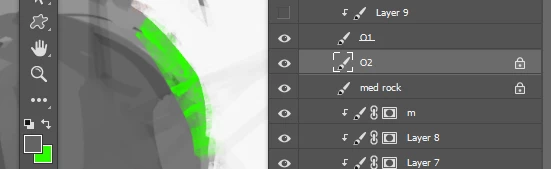
Super common problem with artists i talk to but nobody knows if there's a way around it. Again here, search result over the years (once or twice a year see if i get lucky) always return flooded with "how to get rid of background" tutorials.
Thaaanks!
Otnaug Ab
 AdChoices