Participant
June 15, 2021
Answered

Looking for CS6 Patterns & Textures?

  • June 15, 2021
  • 2 replies
  • 817 views

All,


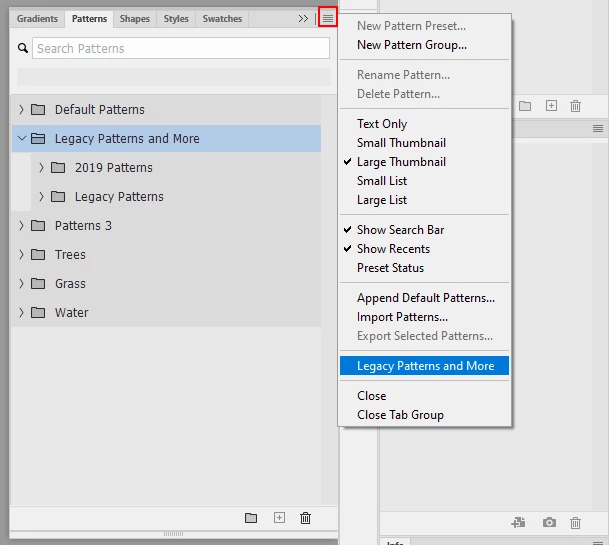
I recently upgraded to Creative Cloud after years of using CS6. Please bear with me because some of this is very new to me. On CS6 you could load a bunch of preset textures which I used regularly. On the Creative Cloud version there's only three folders of: trees grass and water. Is there anyway I can get all those old textures back?  


I really appreciate all your help in advance! I am in a band and I do a bunch of graphics for the band!


Rob
This topic has been closed for replies.
Correct answer Jeff Arola

Yes from the Window>Patterns flyout menu click Legacy Patterns and More.


2 replies

Nancy OShea
Community Expert
Community Expert
June 15, 2021

Hi @rgarven,

In addition to what @Jeff Arola said, don't limit yourself to just what Photoshop offers.  You'll find plenty of free PS patterns & textures available online.  Google & Bing will reveal many more.  

https://speckyboy.com/free-seamless-patterns/


Plus you can create your own custom pattern presets.

https://helpx.adobe.com/photoshop/using/creating-patterns.html


Nancy O'Shea— Product User & Community Expert
rgarvenAuthor
Participant
June 16, 2021

Thank you all! You Rock. I did the layout for our bands latest album, and finally upgraded. I wish I had done it a long time ago but I was mad when they went to subscription, (like everything else now). I was never an expert but got some good results. I will probably need some more help, so thank you once again!


Rob 


[personal information removed by moderator]


Robert GarvenDrummer / Cirith UngolPaisteArtist:https://www.paiste.com/en/musicians/robert-garven
Jeff Arola
Community Expert
Jeff ArolaCommunity ExpertCorrect answer
Community Expert
June 15, 2021

Yes from the Window>Patterns flyout menu click Legacy Patterns and More.