Participant
June 9, 2021
Question

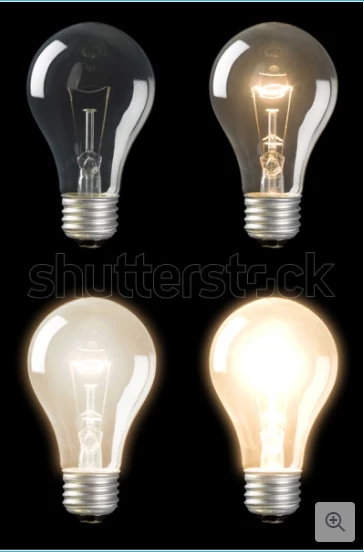
Looking for guidance on removing the dark color within picture

  • June 9, 2021
  • 3 replies
  • 901 views

Hi - I purchased an image on Shutterstock, not realizing the black background would remain in the bulbs after removing the background.  Any advice on removing or lightening the color within the bulbs - at least the top two? I am really new to Photoshop and would appreciate any help you can provide.  I am using the creative cloud version 22.4.2
 

This topic has been closed for replies.

3 replies

jane-e
Community Expert
Community Expert
June 9, 2021

Hi


What format is the image in? Is it vector or raster?


If it's vector (as it seems to be), open it in Illustrator and hide or delete the black background layer. When you use one of the lightbulbs in Photoshop, be sure it is on a dark-ish background.


~ Jane


Norman Sanders
Legend
June 9, 2021

.


Myra Ferguson
Community Expert
Community Expert
June 9, 2021

Try the following:

  1. Select the layer with the light bulbs
  2. Go to Layer > Layer Style > Blending Options
  3. In the Layer Style dialog, in the center section under Blending Options, go to the bottom section called Blend If
  4. Keep the dropdown menu set to Gray
  5. Look below the gradient ramp labeled "This layer," there are two teardrop-shaped indicators.
  6. Alt (PC)/Option (macOS) + click on the left one to split it into two halves of an indicator. (The lighter line down the center will turn darker).
  7. Drag the right half of that indicator almost all the way to the right.
  8. If you want the background more transparent, change the dropdown menu to Blue and repeat steps 5-7.
Norman Sanders
Legend
June 10, 2021


Duplicate the layer. Notice that the bulb in the upper left is not lit. That suggests the filament is darker than the area inside the bulb. The result shown  was obtained by making a duplicate of the bulb, making a Selection of the entire glass area and applying Image > Adjust > Invert.

The result was then modified with a Curve adjustment . A mask was applied to the area in order to turn the two light reflections from black to near white.


The bulb in the upper right was a simple Curve adjustment that was made after changing the Mode from RGB to Lab Color and bending only the Lightness curve in order to keep from draining all the color from the area. Then it was returned to RGB.


Forgive the crude rendition. The image presented was much too small to work on with precision but adequate for a display of the solution.