

Losing detail in highlights after ACR to Photoshop
I have an image with white-like highlight on the subject face, however not blown out. When I take down the exposure in ACR the highlights show all the details again nicely. However when I don't touch the exposure in ACR and just proceed to Photoshop, the exposure and brightness adjustment layer yield a far inferior, rather uncomparable result with little to no detail. Also when I immediatelly apply Camera Raw filter on the created background layer the results are again immediatelly worse.
I seem to have improved the quality by switching from 8 bit / channel to ProPhoto RGB 16 bit / channel but the difference is still there and very apparent. From what I have researched there might be really no way of fixing that and no right space or bit depth to fix this. I want to confirm that is true and that I will always lose data before I get to retouch the photo in Photoshop.
My goal was to selectively burn the blown parts of the image in PS but once I get to it the data has already been lost.
Probably a newbie problem. Is there any workflow to to be able to do this or any other/better approach to recover the details in the highlights?
Original photo in ACR:

In ACR with exposure taken down:
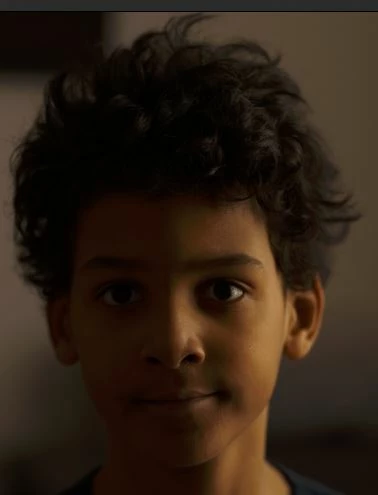
Reopened in ACR after opening in Photoshop and exposure taken down:

In Photoshop with brightness taken down:
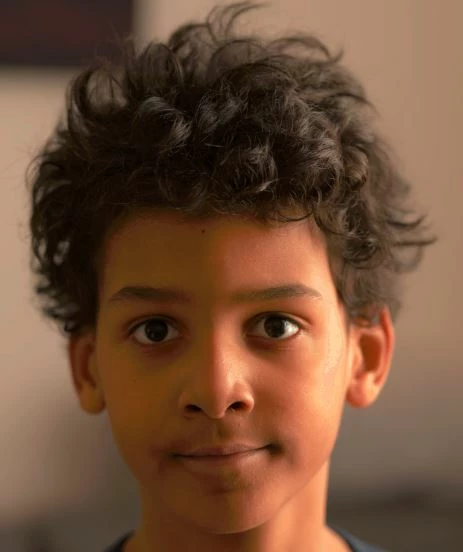
In Photoshop with exposure adjusment layer tuned down:

 AdChoices