rogeriodec
Participating Frequently
July 31, 2020
Answered

Losing workspace layout

  • July 31, 2020
  • 1 reply
  • 680 views

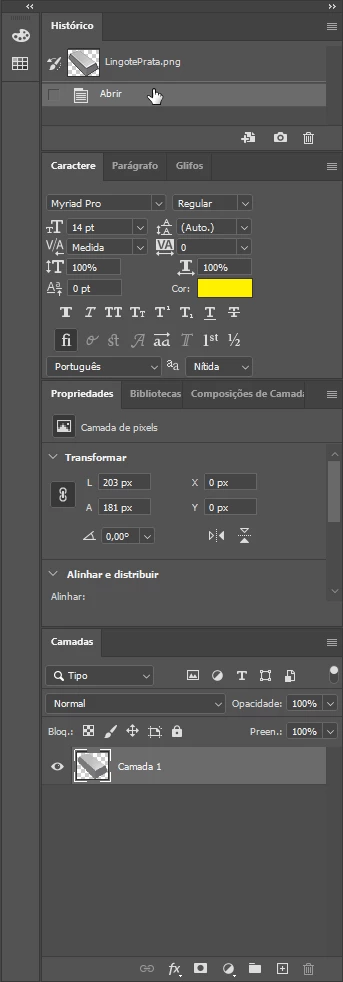
I created this workspace layout:


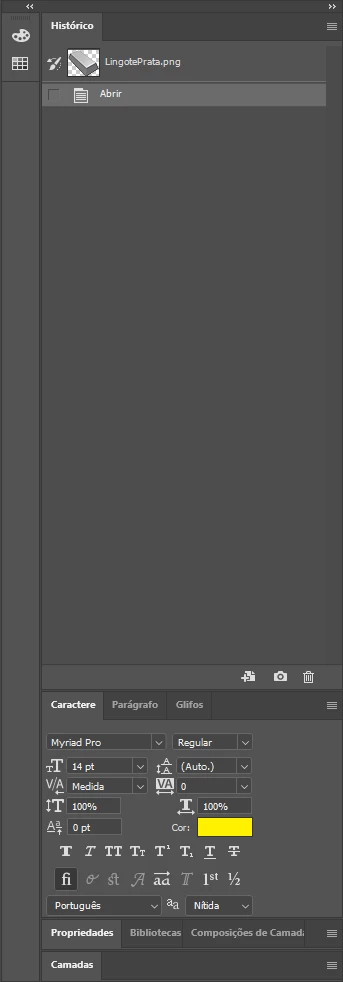
When I restart Photoshop 2020 I get this layout:
How to keep my current layout?

This topic has been closed for replies.
Correct answer c.pfaffenbichler

Does this also affect other Workspaces? 

Like if you create a new one? 


What have you done for general trouble-shooting so far? 

Restoring Preferences after making sure all customized presets like Actions, Patterns, Brushes etc. have been saved might be a good starting point, but there might also be a permissions issue:

https://helpx.adobe.com/photoshop/kb/basic-trouble-shooting-steps.html


Worst case I suspect you might be able to use Script Events manager to reset the Workspace at the opening event – admittedly a clunky work-around, but maybe better than nothing … 

1 reply

c.pfaffenbichler
Community Expert
Community Expert
July 31, 2020

What happens when you select your Workspace under Window > Workspace > …? 

What happens when you select Window > Workspace > Reset …? 

rogeriodec
Participating Frequently
July 31, 2020

The current workspace is my personal workspace I created, named "rogerio". 

It's already selected, but as I said, when I exit PS and open it again, it's not preserving the current layout, in this case, the tabs "Propriedades" (Properties) and "Camadas" (Layers) is opening collapsed, so I have always to click on them to restore.

"Window > Workspace > Reset " restore the correct layout. But every time I restart PS, I have to reset the layout.

In short, PS is not keeping the current workspace layout.

c.pfaffenbichler
Community Expert
c.pfaffenbichlerCommunity ExpertCorrect answer
Community Expert
July 31, 2020

Does this also affect other Workspaces? 

Like if you create a new one? 


What have you done for general trouble-shooting so far? 

Restoring Preferences after making sure all customized presets like Actions, Patterns, Brushes etc. have been saved might be a good starting point, but there might also be a permissions issue:

https://helpx.adobe.com/photoshop/kb/basic-trouble-shooting-steps.html


Worst case I suspect you might be able to use Script Events manager to reset the Workspace at the opening event – admittedly a clunky work-around, but maybe better than nothing …