Answered
Lost "photos" control and window control
Sorry for what is probably a really dumb, stupid question.
Don't know what I did, but I lost the ability to control the open files along with the basic windows controls. Don't even know what these are "called" so hard to search for how to fix. Below is screen shot from the manual. My view is now no longer showing the photos that it has opened (as I show circled) I have also lost the minimize. maximum, close (upper right of the menu)
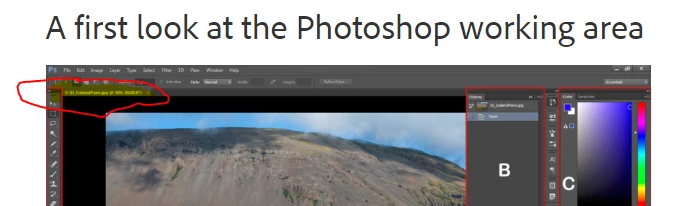
Here is what mine looks like. Window fills monitor only way to minimize is via the PS in upper left and then select minimize from there. Thankfully have 2 screens so was able put snipping tool on one to create this. Can't even figure out how to get back to photo I was working

 AdChoices