
Inspiring
June 6, 2018
Answered

MAC Hardware ID for Photoshop script

  • June 6, 2018
  • 1 reply
  • 3075 views

In the MAC OSX platform what are the options to identify the hardware where the files are processed?

For instance can the computer model be obtained through the javascript or ESTK?

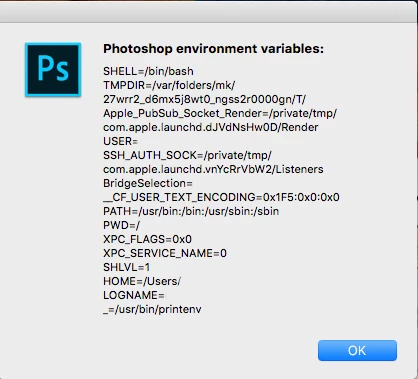
I looked into the Photoshop environment variables and found the ones listed in the screenshot but nothing that identifies the hardware.
This topic has been closed for replies.
Correct answer JJMack

The environment variable COMPUTERNAME exists in Windows, but I dont think the computer name is stored in any environment variables for OSX which is why I resorted to using scutil.


So a hack like this may work on both platforms.

#target photoshop 

function getSystemCommandStdout (command)   

{   

    var stdout = "";   

    var tempFile = new File (Folder.temp + "/temp.txt");   

    app.system (command + " > " + tempFile.fsName);   

    if (tempFile.open ("r"))   

    {   

        stdout = tempFile.read ();   

        tempFile.close ();   

        tempFile.remove ();   

    }   

    return stdout;   

}   

if ($.os.match(/windows/i)) var computerName = getSystemCommandStdout("echo %COMPUTERNAME%"); 

else var computerName = getSystemCommandStdout("scutil --get ComputerName"); 

$.writeln(computerName);

1 reply

JJMack
Community Expert
Community Expert
June 7, 2018

On Windows Photoshop System Info had a lot of information about ones hardware I would think the same type of information about you mac would be there.  A script should be able to get that information.  Other Hardware information most likely could obtained through your Mac OS features and commands.

Here is the beginning of my ]Windows Photoshop system Info.

Adobe Photoshop Version: 19.1.4 20180507.r.325 2018/05/07: 1170750  x64

Number of Launches: 357

Operating System: Windows 10 64-bit

Version: 10 or greater 10.0.17134.1

System architecture: Intel CPU Family:6, Model:13, Stepping:7 with MMX, SSE Integer, SSE FP, SSE2, SSE3, SSE4.1, SSE4.2, AVX, HyperThreading

Physical processor count: 12

Logical processor count: 24

Processor speed: 1995 MHz

Built-in memory: 40886 MB

Free memory: 2 MB

Memory available to Photoshop: 33152 MB

Memory used by Photoshop: 90 %

Alias Layers: Disabled.

Modifier Palette: Disabled.

Highbeam: Enabled.

Image tile size: 1024K

Image cache levels: 4

Font Preview: Huge

TextComposer: Latin

Display: 1

Display Bounds: top=0, left=0, bottom=1080, right=1920

Display: 2

Display Bounds: top=0, left=-1920, bottom=1080, right=0

OpenGL Drawing: Enabled.

OpenGL Allow Old GPUs: Not Detected.

OpenGL Drawing Mode: Advanced

OpenGL Allow Normal Mode: True.

OpenGL Allow Advanced Mode: True.

AIFCoreInitialized=1

AIFOGLInitialized=1

OGLContextCreated=1

NumGLGPUs=1

NumCLGPUs=1

NumNativeGPUs=0

glgpu[0].GLVersion="4.1"

glgpu[0].IsIntegratedGLGPU=0

glgpu[0].GLMemoryMB=2048

glgpu[0].GLName="NVIDIA Quadro 4000"

glgpu[0].GLVendor="NVIDIA Corporation"

glgpu[0].GLVendorID=4318

glgpu[0].GLDriverVersion="10.18.13.5362"

glgpu[0].GLRectTextureSize=16384

glgpu[0].GLRenderer="Quadro 4000/PCIe/SSE2"

glgpu[0].GLRendererID=1757

glgpu[0].HasGLNPOTSupport=1

glgpu[0].GLDriver="nvd3dumx.dll,nvwgf2umx.dll,nvwgf2umx.dll,nvwgf2umx.dll"

glgpu[0].GLDriverDate="20150722000000.000000-000"

glgpu[0].CanCompileProgramGLSL=1

glgpu[0].GLFrameBufferOK=1

glgpu[0].glGetString[GL_SHADING_LANGUAGE_VERSION]="4.50 NVIDIA"

glgpu[0].glGetProgramivARB[GL_FRAGMENT_PROGRAM_ARB][GL_MAX_PROGRAM_INSTRUCTIONS_ARB]=[65536]

glgpu[0].glGetIntegerv[GL_MAX_TEXTURE_UNITS]=[4]

glgpu[0].glGetIntegerv[GL_MAX_COMBINED_TEXTURE_IMAGE_UNITS]=[192]

glgpu[0].glGetIntegerv[GL_MAX_VERTEX_TEXTURE_IMAGE_UNITS]=[32]

glgpu[0].glGetIntegerv[GL_MAX_TEXTURE_IMAGE_UNITS]=[32]

glgpu[0].glGetIntegerv[GL_MAX_DRAW_BUFFERS]=[8]

glgpu[0].glGetIntegerv[GL_MAX_VERTEX_UNIFORM_COMPONENTS]=[4096]

glgpu[0].glGetIntegerv[GL_MAX_FRAGMENT_UNIFORM_COMPONENTS]=[4096]

glgpu[0].glGetIntegerv[GL_MAX_VARYING_FLOATS]=[124]

glgpu[0].glGetIntegerv[GL_MAX_VERTEX_ATTRIBS]=[16]

glgpu[0].extension[AIF::OGL::GL_ARB_VERTEX_PROGRAM]=1

glgpu[0].extension[AIF::OGL::GL_ARB_FRAGMENT_PROGRAM]=1

glgpu[0].extension[AIF::OGL::GL_ARB_VERTEX_SHADER]=1

glgpu[0].extension[AIF::OGL::GL_ARB_FRAGMENT_SHADER]=1

glgpu[0].extension[AIF::OGL::GL_EXT_FRAMEBUFFER_OBJECT]=1

glgpu[0].extension[AIF::OGL::GL_ARB_TEXTURE_RECTANGLE]=1

glgpu[0].extension[AIF::OGL::GL_ARB_TEXTURE_FLOAT]=1

glgpu[0].extension[AIF::OGL::GL_ARB_OCCLUSION_QUERY]=1

glgpu[0].extension[AIF::OGL::GL_ARB_VERTEX_BUFFER_OBJECT]=1

glgpu[0].extension[AIF::OGL::GL_ARB_SHADER_TEXTURE_LOD]=1

clgpu[0].CLPlatformVersion="1.2"

clgpu[0].CLDeviceVersion="1.1 CUDA"

clgpu[0].IsIntegratedCLGPU=0

clgpu[0].CLMemoryMB=2048

clgpu[0].CLName="Quadro 4000"

clgpu[0].CLVendor="NVIDIA Corporation"

clgpu[0].CLVendorID=4318

clgpu[0].CLDriverVersion="353.62"

clgpu[0].CLBandwidth=7.48614e+10

clgpu[0].CLCompute=191.732

License Type: Subscription

Serial number: 90970090970448917498

GUIDBucket:

Application folder: C:\Program Files\Adobe\Adobe Photoshop CC 2018\

Temporary file path: C:\Users\jjmac\AppData\Local\Temp\

Photoshop scratch has async I/O enabled

Scratch volume(s):

  Startup, 224.2G, 121.4G free

Required Plug-ins folder: C:\Program Files\Adobe\Adobe Photoshop CC 2018\Required\Plug-Ins\

Primary Plug-ins folder: C:\Program Files\Adobe\Adobe Photoshop CC 2018\Plug-Ins\

JJMack
sidpalas
Inspiring
June 8, 2018

The app.systemInformation call is what you are looking for.

It should provide info similar to what JJMack​ pasted above for OSX as well.​

Inspiring
June 8, 2018

app.systemInformation has a lot of interesting spec. I am trying to find an approach to identify the computer where the files are processed in a multi computer environment. My idea to have each computer write to a master cvs file the date, time number of files, file processing recipe  and computer name/model/work station. The part that I can not figure out is how to identify  the computer in the script. The app.systemInforamtion does not include the computer name.