
Inspiring
August 2, 2022
Answered

Mac Photoshop with Wacom Intuos Pro and a compass-like figure on the screen??

  • August 2, 2022
  • 3 replies
  • 1478 views

I'm using a pretty new Wacom Intuos Pro with the latest Mac Photoshop. Every now and then it happens that when I begin to work on a detail in a photo, that is, I put my hand with a Wacom pen on the tablet, a compass-like figure with a red arrow pointing up appears on the screen. If I try to do something when this happens, very often the photo rotates in a really visible way. If the figure appears, and I just lift my hand, usually nothing happens, and the figure disappears. So far, I haven't found a way to cancel the rotation, and therefore I need to close the window. The Wacom support cannot help me in this issue. All comments welcome!
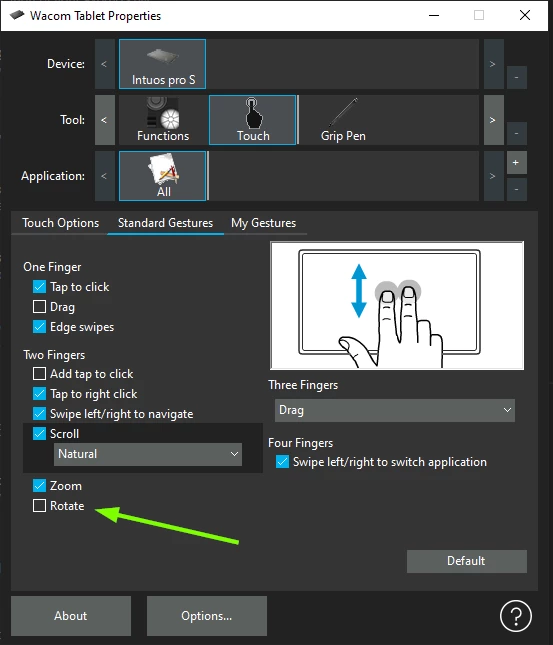
Correct answer Ged_Traynor

You can also disable the rotate option in the Wacom preferences

3 replies

Ged_Traynor
Community Expert
Ged_TraynorCommunity ExpertCorrect answer
Community Expert
August 2, 2022

You can also disable the rotate option in the Wacom preferences

Inspiring
August 2, 2022

OK. It is in Touch/Standard gestures. I didn't know that I'm using them, as I was working with the pen.... It seems that I also had Touch combined with PS. It is of course pointless! Thanks!

tuomasvirtanenNET
c.pfaffenbichler
Community Expert
Community Expert
August 2, 2022

You can also disable Tool Gestures in the Preferences. 

c.pfaffenbichler
Community Expert
Community Expert
August 2, 2022

What are your Photoshop > Preferences > Tools settings? 

c.pfaffenbichler
Community Expert
Community Expert
August 2, 2022

If I try to do something when this happens, very often the photo rotates in a really visible way. 

I guess that’s why it is called the Rotate View Tool. 

To reset try hitting esc