



NB, colourmanagement
Community Expert
Community Expert
March 25, 2025
Answered

macOS Sequioa / Photoshop 25 and messed up print settings during printing

  • March 25, 2025
  • 12 replies
  • 1739 views

It's no wonder there have been a few threads here about printing from macOS Sequoia.


I'm not an early adopter, meaning my main Mac is still on macOS Ventura and, mainly, PS24, so I've not experienced this printing issue.. But, today I experienced the Sequoia/Photoshop 25 print pipeline issue we've been hearing about here.

I wonder about macOS Sonoma too now. 


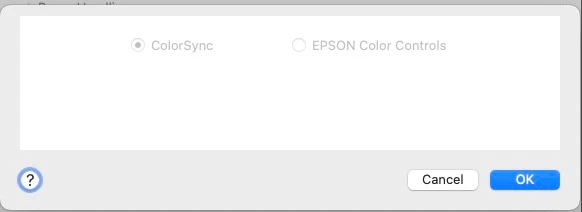
In Photoshop's print process, I prefer to use Photoshop Manages Color and select the ICC profile myself - meaning that, now, I just need to go to the Print Settings (which opens the Epson or Canon etc. print driver), and, there, under Printer Options/Print Settings I select the media type and also check that in the Color Matching section the options are greyed out - with Colorsync selected [here, as below, the options should be greyed, because selecting Photoshop Manages Color tells the driver to disable color management]. 
What's the issue with printing?
Selected options within Print Settings / Printer Options which are correctly used on macOS Ventura with Photoshop 24 and Photoshop 25, but are not in Sequoia with Photoshop 25. I am not using the 'Airprint' driver [that has its own issues] but, either Epson or Canon's own print driver software. (Not the layout print plug ins from either)


In Sequoia with Photoshop 25, after selecting the right media in Printer Options, I now need to click Save to get back to Photoshop's Print button. [it was click 'OK' in PS25 in Ventura, so, Save here came with Photoshop 25]

The problem now is that the media I selected by name is NOT saved, it doesn’t stick [so prints are bad] - if I go straight back to Print Settings/Printer Options/Print Settings to check what's being used, the Media selection here has reverted to whatever was default.

[AND on a Canon Printer the perceptual option has reappeared too (more on that below).]


To add to the confusion, in my test on a Canon driver, there's also a Perceptual or NO Color Adjusment option there. Perceptual should not be offered, since Photoshop is doing the color management. Selecting NO Color Adjustment here doesn’t stick either, it apparently reverts to Perceptual when the window closes after saving.

No wonder prints are bad.


Apple? Adobe? Epson? Canon? who's messed this up? 


I hope this helps

neil barstow colourmanagement - adobe forum volunteer,

colourmanagement consultant & co-author of 'getting colour right'

See my free articles on colourmanagement online

Help others by clicking "Correct Answer" if the question is answered.

Found the answer elsewhere? Share it here. "Upvote" is for useful posts

Correct answer NB, colourmanagement

Just in case it's helpful to anyone with this issue, Canon's Professional Print & Layout software ( a Photoshop plug-in) works properly with ICC profiles and even allows printing with colour management turned off, so that profiling targets can be printed. 


I'd imagine Epson's similarly named Print layout software provides better control over printing (with ICC profiles) also, it doesn’t, though, allow printing with colour management turned off so that profiling targets can be printed


I hope this helps

neil barstow colourmanagement - adobe forum volunteer,

colourmanagement consultant & co-author of 'getting colour right'

See my free articles on colourmanagement online

Help others by clicking "Correct Answer" if the question is answered.

Found the answer elsewhere? Share it here. "Upvote" is for useful posts


12 replies

gifted_smarts15D5
Participating Frequently
August 4, 2025

yes it's a total mess.  Apple preview will sve a preset correctly no adobe product will.  it is a complete mess to deal with.  I end up saving whatever I'm doing and the forced to re-open in Preview to print.  this is dumb.

NB, colourmanagement
Community Expert
NB, colourmanagementCommunity ExpertAuthorCorrect answer
Community Expert
June 16, 2025

Just in case it's helpful to anyone with this issue, Canon's Professional Print & Layout software ( a Photoshop plug-in) works properly with ICC profiles and even allows printing with colour management turned off, so that profiling targets can be printed. 


I'd imagine Epson's similarly named Print layout software provides better control over printing (with ICC profiles) also, it doesn’t, though, allow printing with colour management turned off so that profiling targets can be printed


I hope this helps

neil barstow colourmanagement - adobe forum volunteer,

colourmanagement consultant & co-author of 'getting colour right'

See my free articles on colourmanagement online

Help others by clicking "Correct Answer" if the question is answered.

Found the answer elsewhere? Share it here. "Upvote" is for useful posts


NB, colourmanagement
Community Expert
Community Expert
April 30, 2025

@keith_7272 sadly your solution didn't work with a Canon. What a pain


neil barstow colourmanagement - adobe forum volunteer,

colourmanagement consultant & co-author of 'getting colour right'

See my free articles on colourmanagement online

Found the answer elsewhere? Share it here. "Upvote" is for useful posts 

NB, colourmanagement
Community Expert
Community Expert
April 15, 2025

@keith_7272 thanks very much for the confirmation that your workaround was for masOS Sequoia - I'm super impressed that you got to the bottom of that issue


sadly it's not a universal fix though. Tested 11 September 2025 and it's not helping. 


In case anyone needs to test it - this was Keith's soliution on the other Sequioa printing thread:

https://community.adobe.com/t5/photoshop-ecosystem-discussions/mac-sequoia-and-prints/m-p/15254527#M860454


keith_7272

New Here Apr 07, 2025

Copy link to clipboard


I feel your pain. I had a related problem on my Epson (in this case, excessive magenta). I don't know whether this solution will work for you, but after hours of uninstalling and reinstalling and internet searching, this is the simple step that worked for me:


Go System settings>Privacy and Security, Local Network. Make sure all relevant applications are toggled on. In my case two Epson ones -- including  'rastertoescpII' -- were toggled off. As soon as I turned them on, Photoshop could once again interface seamlessly with my printer, and the prints came out perfectly.


I hope this helps those having issues 

neil barstow colourmanagement - adobe forum volunteer,

colourmanagement consultant & co-author of 'getting colour right'

See my free articles on colourmanagement online

Help others by clicking "Correct Answer" if the question is answered.

Found the answer elsewhere? Share it here. "Upvote" is for useful posts


Participant
April 14, 2025

Just to clarify my earlier post, I am using Seqouia. Local Network may appear in a different menu in Ventura, but it has to be there somewhere. 

NB, colourmanagement
Community Expert
Community Expert
April 14, 2025

In an update on another thread about this a user has made some useful suggestions:


New Here 
Apr 07, 2025

Copy link to clipboard


I feel your pain. I had a related problem on my Epson (in this case, excessive magenta). I don't know whether this solution will work for you, but after hours of uninstalling and reinstalling and internet searching, this is the simple step that worked for me:


Go System settings>Privacy and Security, Local Network. Make sure all relevant applications are toggled on. In my case two Epson ones -- including  'rastertoescpII' -- were toggled off. As soon as I turned them on, Photoshop could once again interface seamlessly with my printer, and the prints came out perfectly.


I hope this helps

neil barstow colourmanagement - adobe forum volunteer,

colourmanagement consultant & co-author of 'getting colour right'

See my free articles on colourmanagement online

Help others by clicking "Correct Answer" if the question is answered.

Found the answer elsewhere? Share it here. "Upvote" is for useful posts


Participant
August 4, 2025

Also using Sequoia - I can now save presets (Epson 2200) and generate a neutral B&W print! I went to System settings>Privacy and Security, Local Network and turned on 5 items, possibly overkill, including 3 Epson items (Printer, Printer Setup Utility and Connect Printer Setup) as well as Lightroom and Lightroom Classic. Previously I could not save presets in Lightroom Classic, and B&W prints had inconsistent color issues (green, cyan or magenta cast). 

NB, colourmanagement
Community Expert
Community Expert
March 27, 2025

@MarkDS as I wrote, its right that their profiles previously included some secret sauce by way of linearisation curves, I had a friend who went thorough all this. Maybe that’s changed. maybe not as it would have provided a revenue stream. I'd love to know 

I looked at their site to try find out, I still don't have the answer, but I did discover one good thing, they seem to have made ICC media profiles available for many media manufacturer's products - that can only be good, more here:  https://www.youtube.com/watch?v=sn1KrMrpfcY&list=PLKNLpLq9jyF6tK99LNiL6EAgPte_I8M64&index=16&t=34s


neilB 

MarkDS
Inspiring
March 26, 2025

Neil, my understanding of ImagePrint is that it works with one's own custom profiles. But I also understand, from some time back now, they will also make custom profiles for customers on request.

NB, colourmanagement
Community Expert
Community Expert
March 26, 2025

@MarkDS Yes Colorbyte Image Print, as you mention - it's quite expensive at $900 for a 17" printer and I believe it uses (*or used to use) a proprietary form of ICC profile with some extra 'curves' inside - so that only Colorbyte made profiles can get give results. I was told that the linearisation curves one would normally make (pre profiling) when working with a RIP are inside their profiles (and only their profiles)  We'd think of those linearidsations as media settings in an Epson or Canon driver. Meaning that users had to getColorbyte to make media profiles for them.

Mind you, this was some time ago.

There were also complaints about periodic upgrade costs, we're a bit more used to that these days. 


For general use the print drivers are (were) a very acceptable way to get decent print, but, of course not if Apple mess up how the drivers work. I used to have an inside line into the Colorsync guy at Apple but I don't think there's any such guy now. I do have one contact I'll see what I can do with them


neil barstow colourmanagement - adobe forum volunteer,

colourmanagement consultant & co-author of 'getting colour right'

See my free articles on colourmanagement online


MarkDS
Inspiring
March 26, 2025

Neil- probably worth also mentioning ImagePrint by Colorbyte software. I have not used it myself, but I've seen it in action at the late Kevin Raber's studio and heard very good feedback from people whose judgment I trust that it works well. I suspect it works around the factors affecting the issues we are discussing here. I hope to have a conversation with them to delve more into that, as it may be a viable alternative to using the printer drivers in a MacOS environment. The only problem with it is commercial; it's not cheap but I understand they offer excellent support.