
devonlee210
Participant
December 1, 2015
Answered

Magic wand tool is selecting multiple items and will not let me deselect anything I do not want

  • December 1, 2015
  • 3 replies
  • 17329 views

I was using the shift key to select multiple items and all of a sudden Photoshop cc is not letting me deselect ANYTHING.

I do not even have to press the shift key now- it automatically selects anything I click.

The items that are being selected are not the same colors so I know it's not just mistaking these items as what I want.

Is it possible that I have accidentally changed something to where it is set to automatically select anything I click?

Why is it that now when I try to deselect anything, it does not do it? I can click a specific item to select it and then click the exact same spot and it will not deselect.

Please help! Somewhat new but I was easily using the magic wand to select text and fill with "content-aware" but now even when I do fill, it leaves that section selected and then will not allow me to deselect anything period.
This topic has been closed for replies.
Correct answer Benjamin Root

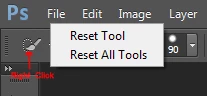
The tool reset:

3 replies

khatwani
Adobe Employee
Adobe Employee
December 1, 2015

Hi

Greetings!!!

Try reset of  tool

To reset a tool, you must first have the tool selected. Then Control-Click (Windows users: Right-Click) on the Tool Preset button in the Tool Options bar.

Reset-Tool1

When you click on this button you will see a small menu appear and you can select Reset Tool to reset the current tool to its default setting or Reset All Tools to reset all the tools to its default setting. Once selected, the tool should act just like the first time you used it.

Reset-Tool2

By using this simple method of resetting your tool with one click you can quickly fix any situation where the tool is not responding correctly and keep the flow of creativity going.

Regards

Jitendra

Benjamin Root
Benjamin RootCorrect answer
Legend
December 1, 2015

The tool reset:

c.pfaffenbichler
Community Expert
Community Expert
December 1, 2015

Have you reset the Tool yet?

Please post a screenshot with the Options Bar visible.