

Kukurykus
Legend
December 5, 2018
Answered

Make selection from a path missing values in ScriptListener

  • December 5, 2018
  • 3 replies
  • 1173 views

I tried it in CS6 Extended and CC2019 and found ScriptListener doesn't record everyting that can be done via DOM method:

When you have path item in image (you can do it for ex. from selection by 'Paths' panel clicking 'create workpath' icon) and you want to make selection from the path with certain feather you open dropdown menu (in right upper corner) of 'Paths' panel and then choose 'Make Selection' item.

In the 'Make Selection' dialog you can set Anti-Aliased, the kind of selection and quantity of feather. Unfortunatelly when you check ScriptListener log you will find that only 'selection from path' was recorded, but neither 'Anti-aliased', not 'feather'. So any time you use that code it will retirieve the last used values! The only way to change it is to manually change them, so next time they are going to be set to new ones.

In contrary to Action Manager code you can specify all values from 'Make Selection' dialog by Domestic Oriented Method:

activeDocument.pathItems[0].makeSelection(10, true, SelectionType.REPLACE)

while in Action Manager code recorded by ScriptListener there's nothing about 'feather', 'Anti-aliased', and 'Selection Type':

var idsetd = charIDToTypeID( "setd" );

    var desc1 = new ActionDescriptor();

    var idnull = charIDToTypeID( "null" );

        var ref1 = new ActionReference();

        var idChnl = charIDToTypeID( "Chnl" );

        var idfsel = charIDToTypeID( "fsel" );

        ref1.putProperty( idChnl, idfsel );

    desc1.putReference( idnull, ref1 );

    var idT = charIDToTypeID( "T   " );

        var ref2 = new ActionReference();

        var idPath = charIDToTypeID( "Path" );

        var idWrPt = charIDToTypeID( "WrPt" );

        ref2.putProperty( idPath, idWrPt );

    desc1.putReference( idT, ref2 );

    var idVrsn = charIDToTypeID( "Vrsn" );

    desc1.putInteger( idVrsn, 1 );

    var idvectorMaskParams = stringIDToTypeID( "vectorMaskParams" );

    desc1.putBoolean( idvectorMaskParams, true );

executeAction( idsetd, desc1, DialogModes.NO );

So my questions are:

1) why DOM doesn't mirror AM in this case?

2) what lines add to AM code it let you set lacking values?

3) what is "vectorMaskParams" and "Vrsn" used for in SL output?
This topic has been closed for replies.
Correct answer r-bin

It can be recorded, but in a tricky way.

AM-code

var d = new ActionDescriptor();

var r = new ActionReference();

r.putProperty(stringIDToTypeID("channel"), stringIDToTypeID("selection"));

d.putReference(stringIDToTypeID("null"), r);

var r1 = new ActionReference();

r1.putProperty(stringIDToTypeID("path"), stringIDToTypeID("workPath"));

d.putReference(stringIDToTypeID("to"), r1);

d.putBoolean(stringIDToTypeID("antiAlias"), true);

d.putUnitDouble(stringIDToTypeID("feather"), stringIDToTypeID("pixelsUnit"), 10);

executeAction(stringIDToTypeID("set"), d, DialogModes.NO);

3 replies

JJMack
Community Expert
Community Expert
December 5, 2018

The same happened to me so I took some code fro a set matquee function I did will scriptlistener cod I ise ine mt AspectRatioSelection.jsx Photoshop Plug-in script  I modeled after Adobe's  Fit Image Plug-in script  I replace the varable  for feather with 25 ade 1 trure for AntA.   Path and Selection seem to has some of the same options. When I Added it  your code it worked.

var idsetd = charIDToTypeID( "setd" );

    var desc1 = new ActionDescriptor();

    var idnull = charIDToTypeID( "null" );

        var ref1 = new ActionReference();

        var idChnl = charIDToTypeID( "Chnl" );

        var idfsel = charIDToTypeID( "fsel" );

        ref1.putProperty( idChnl, idfsel );

    desc1.putReference( idnull, ref1 );

    var idT = charIDToTypeID( "T   " );

        var ref2 = new ActionReference();

        var idPath = charIDToTypeID( "Path" );

        var idWrPt = charIDToTypeID( "WrPt" );

        ref2.putProperty( idPath, idWrPt );

    var id17 = charIDToTypeID( "Fthr" );

    var id18 = charIDToTypeID( "#Pxl" );

    desc1.putUnitDouble( id17, id18, 25 );

    var id19 = charIDToTypeID( "AntA" );

    desc1.putBoolean( id19,1 );

    desc1.putReference( idT, ref2 );

    var idVrsn = charIDToTypeID( "Vrsn" );

    desc1.putInteger( idVrsn, 1 );

    var idvectorMaskParams = stringIDToTypeID( "vectorMaskParams" );

    desc1.putBoolean( idvectorMaskParams, true );

executeAction( idsetd, desc1, DialogModes.NO );

The function I came up with for my plug-in looks like this:

It can set Path or Selection Rectangle or ellipse

/* SetMarqueeSelection function from Scriptlistner plugin

// ========================================================================== */

function setMarqueeSelection(x1, y1, x2, y2, type, shape, feather, antiAlias, doPath) {

if (doPath ==null) { doPath = false; }

var SelectionType =null;

if (type ==null)      { var SelectionType = "setd" }

if (type ==diminish)  { var SelectionType = "SbtF" }

if (type ==extend)    { var SelectionType = "AddT" }

if (type ==intersect) { var SelectionType = "IntW" }

if (type ==replace)   { var SelectionType = "setd" }

var id3 = charIDToTypeID( SelectionType );

    var desc2 = new ActionDescriptor();

    var id4 = charIDToTypeID( "null" );

var ref1 = new ActionReference();

if (doPath) {

var id5 = charIDToTypeID( "Path" );

var id6 = charIDToTypeID( "WrPt" );

}

else {

var id5 = charIDToTypeID( "Chnl" );

var id6 = charIDToTypeID( "fsel" );

}

ref1.putProperty( id5, id6 );

    desc2.putReference( id4, ref1 );

    var id7 = charIDToTypeID( "T   " );

var desc3 = new ActionDescriptor();

var id8 = charIDToTypeID( "Top " );

var id9 = charIDToTypeID( "#Pxl" );

desc3.putUnitDouble( id8, id9, y1 );

var id10 = charIDToTypeID( "Left" );

var id11 = charIDToTypeID( "#Pxl" );

desc3.putUnitDouble( id10, id11, x1 );

var id12 = charIDToTypeID( "Btom" );

var id13 = charIDToTypeID( "#Pxl" );

desc3.putUnitDouble( id12, id13, y2 );

var id14 = charIDToTypeID( "Rght" );

var id15 = charIDToTypeID( "#Pxl" );

desc3.putUnitDouble( id14, id15, x2 );

    var id16 = charIDToTypeID( shape );

    desc2.putObject( id7, id16, desc3 );

    var id17 = charIDToTypeID( "Fthr" );

    var id18 = charIDToTypeID( "#Pxl" );

    desc2.putUnitDouble( id17, id18, feather );

    var id19 = charIDToTypeID( "AntA" );

    desc2.putBoolean( id19, antiAlias );

executeAction( id3, desc2, DialogModes.NO );

}

JJMack
Kukurykus
KukurykusAuthor
Legend
December 5, 2018

Smart move, but how to add selection type to selection from path that is avilable in 'Make Selection' Paths dialog?

What about "vectorMaskParams" and "Vrsn", do you know what's that?

r-binCorrect answer
Legend
December 5, 2018

It can be recorded, but in a tricky way.

AM-code

var d = new ActionDescriptor();

var r = new ActionReference();

r.putProperty(stringIDToTypeID("channel"), stringIDToTypeID("selection"));

d.putReference(stringIDToTypeID("null"), r);

var r1 = new ActionReference();

r1.putProperty(stringIDToTypeID("path"), stringIDToTypeID("workPath"));

d.putReference(stringIDToTypeID("to"), r1);

d.putBoolean(stringIDToTypeID("antiAlias"), true);

d.putUnitDouble(stringIDToTypeID("feather"), stringIDToTypeID("pixelsUnit"), 10);

executeAction(stringIDToTypeID("set"), d, DialogModes.NO);

Kukurykus
KukurykusAuthor
Legend
December 5, 2018

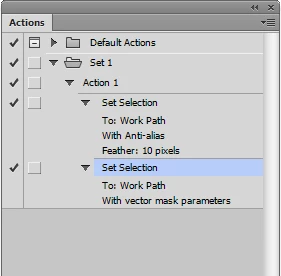
How did you record first 'Set Selection' item? I can only achieve directly the second one. What is that tricky way to do so?

I knew I can use some extra code to available Action Manager code for making selection from path, but to be honest didn't attempt any before making this theard. Thx for your input. btw what line of code should be used for missing part, so New / Add to / Subtract from / Intersect with selection?

Legend
December 5, 2018

Open the Actions panel. Create a set "Set 1".

In the active document, create the Work Path.

Run the script.

var d = new ActionDescriptor();

var r = new ActionReference();

r.putClass(stringIDToTypeID("action"));

d.putReference(stringIDToTypeID("null"), r);

var r1 = new ActionReference();

r1.putName(stringIDToTypeID("actionSet"), "Set 1");

d.putReference(stringIDToTypeID("at"), r1);

var d1 = new ActionDescriptor();

d1.putString(stringIDToTypeID("name"), "Action 1");

d1.putInteger(stringIDToTypeID("functionKey"), 0);

d.putObject(stringIDToTypeID("using"), stringIDToTypeID("action"), d1);

executeAction(stringIDToTypeID("make"), d, DialogModes.NO);

activeDocument.pathItems[0].makeSelection(2, false, SelectionType.REPLACE); 

Stop the recording "Action 1".

Remove all "Get" and "Scripts" commands from Action.

Rerecord the command "Set selection" (double click) with required feathers and anti-alias.
Convert Action to script.

Tested on CS6.

Chuck Uebele
Community Expert
Community Expert
December 5, 2018

This is what I got when I ran the ScriptListener code. I set the feather for radius of 5, with anti-alias, and did a subtract mode. Sometimes you have to change the values from the default, or they won't show up in the AM code:

var idSbtF = charIDToTypeID( "SbtF" );//shows subtract Front

    var desc175 = new ActionDescriptor();

    var idnull = charIDToTypeID( "null" );

        var ref36 = new ActionReference();

        var idChnl = charIDToTypeID( "Chnl" );

        var idfsel = charIDToTypeID( "fsel" );

        ref36.putProperty( idChnl, idfsel );

    desc175.putReference( idnull, ref36 );

    var idT = charIDToTypeID( "T   " );

        var ref37 = new ActionReference();

        var idPath = charIDToTypeID( "Path" );

        var idWrPt = charIDToTypeID( "WrPt" );

        ref37.putProperty( idPath, idWrPt );

    desc175.putReference( idT, ref37 );

    var idAntA = charIDToTypeID( "AntA" );

    desc175.putBoolean( idAntA, true );//Shows anti-alias as being on

    var idFthr = charIDToTypeID( "Fthr" );

    var idPxl = charIDToTypeID( "#Pxl" );

    desc175.putUnitDouble( idFthr, idPxl, 5.000000 );//Show feather for pixel radius

executeAction( idSbtF, desc175, DialogModes.NO );

Kukurykus
KukurykusAuthor
Legend
December 5, 2018

I did exactly what you said but still I couldn't get the result you did. Could you please step by step describe me what you did in Photoshop it resulted as that desired record to ScriptListenerJS.log? So creating document, making selection, and then etc

Chuck Uebele
Community Expert
Community Expert
December 5, 2018

I made a selection and I made a path. With the path selected, I went to the path pallet and held either the alt or ctrl key, as I clicked on the make selection icon. This brings up the dialog box to set the radius and other stuff.