
Manipulating Type in Photoshop 2021
- In the Tools Panel select the T tool
- Right-Click on the T tool to show the hidden tools
- From the drop-down menu select Horizontal Type Tool
- In the Layers Panel, Re-name the layer to TEXT
Note: Determine what it is you want to write. You will need to be 100% sure about this because you will not be able to change it after this step. Check your diction and spelling before moving on.
5. In the Layers Panel, select the TEXT layer
6. Right-Click on the Text Layer
7. From the drop-down menu select Convert to Shape. The text tool in Photoshop is relatively limited. So in order to transform your type freely, convert it into a shape.
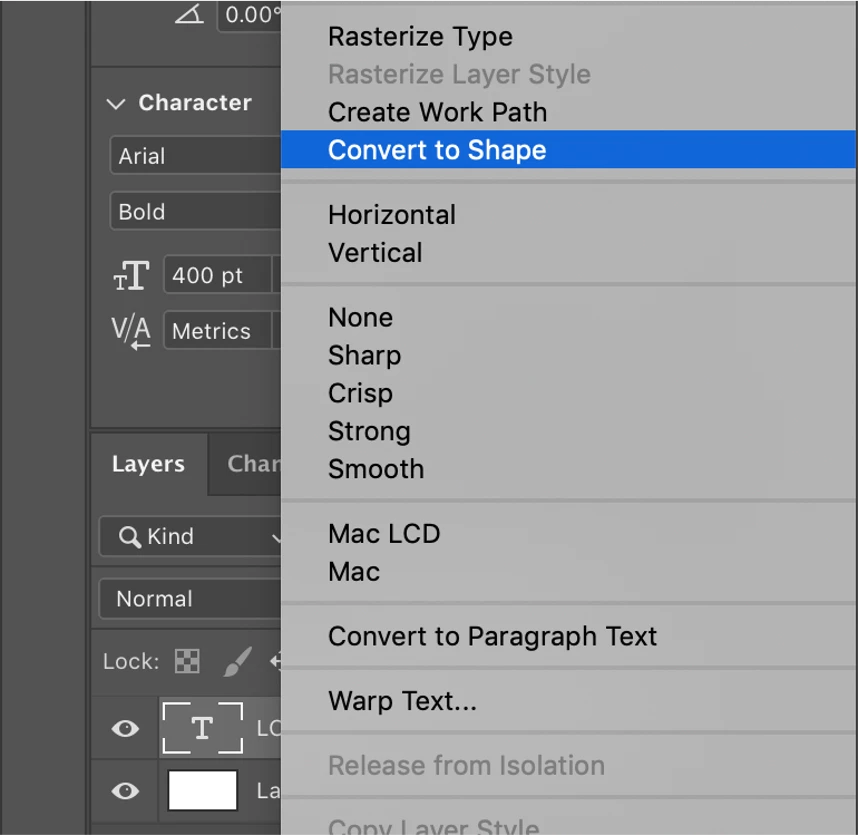
You can see now that the text has turned into a shape, you are able to edit the letters individually.

8. Select the Arrow Tool
9. Press CMD on the keyboard
10. Select the points on the shape and move them
11. In the Menu Bar select, Edit
12. From the drop-down menu select, Transform
13. From the drop-down menu select, Perspective tool. You are now able to edit the text as a whole and transform it into another meaning. Here is the finalised example.

 AdChoices