
Participant
August 29, 2024
Question

Masking in Camera Raw not working

  • August 29, 2024
  • 1 reply
  • 344 views

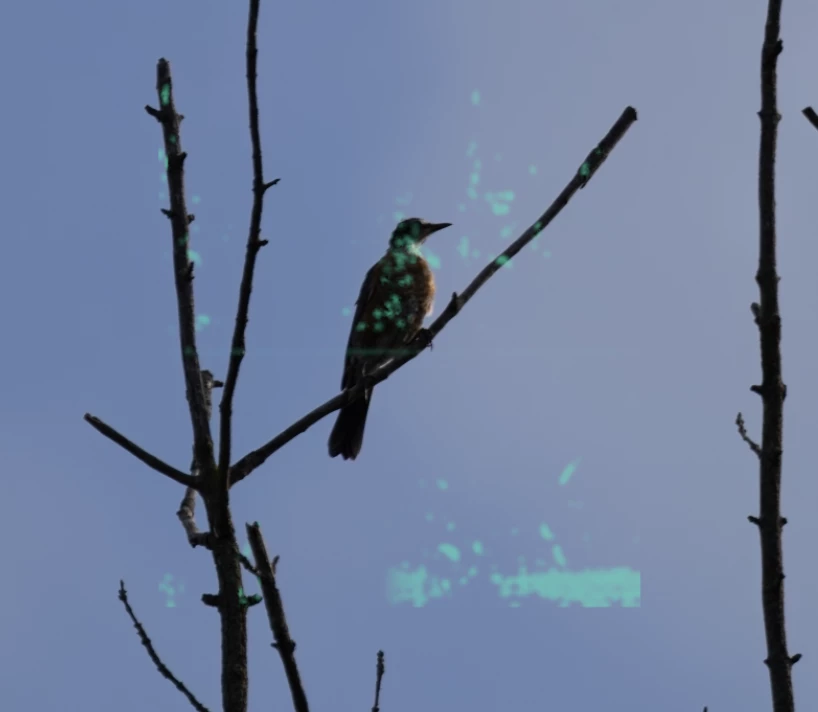
Been having a problem with masking in Camera Raw lately. I tried Subject first, and it said no subject detected. Then I tried to select an Object (the bird) and this is what it returned. This screenshot is from a DNG but it happened on the RAW also. Attaching raw file for reference.
 

This topic has been closed for replies.

1 reply

Participant
August 29, 2024

Forgot to add: this is Photoshop 25.11.0 release.

Sameer K
Community Manager
Community Manager
August 29, 2024

Hey, @Jonathan23144164ehai. Welcome to the Camera Raw Community. I'll help you figure this out. The original post is from last year. Please provide information & share the system info from Photoshop Help > System info > Copy & paste into a text document > upload & attach here.


Are you working with multiple displays? Keep only one connected at a time to test for stability.


In Photoshop, press & hold the CTRL + ALT key and go to Edit > Preferences > Camera Raw Preferences and select 'Yes' when prompted to reset Camera Raw preferences.


Let me know if the issue exists. Thanks!
Sameer K

(Use '@mention' to tag me when you reply)

Participant
September 2, 2024

I successfully reset the preferences, but it did not fix the problem.  It still doesn't see a subject.  Object selection also doesnt work.