Participant
November 21, 2022
Answered

Masks not masking out whole area

  • November 21, 2022
  • 4 replies
  • 1590 views

I am attaching picture of what is happening. I want the photo masked in an octogon and the mask is exactly correct in the layers panel.  But the photo is not masked correctly on the main screen.  I have done this about 20 different ways trying to figure out what is wrong and can't fix it.  I have mostly figured out photoshop myself so am a trial and error kind of user with lots of online videos to supplement as needed.  I cannot find an answer for this issue.  Please help!

Thank you!

Christina
 

This topic has been closed for replies.
Correct answer D Fosse

Agree with Barbara, this is most likely GPU-related.


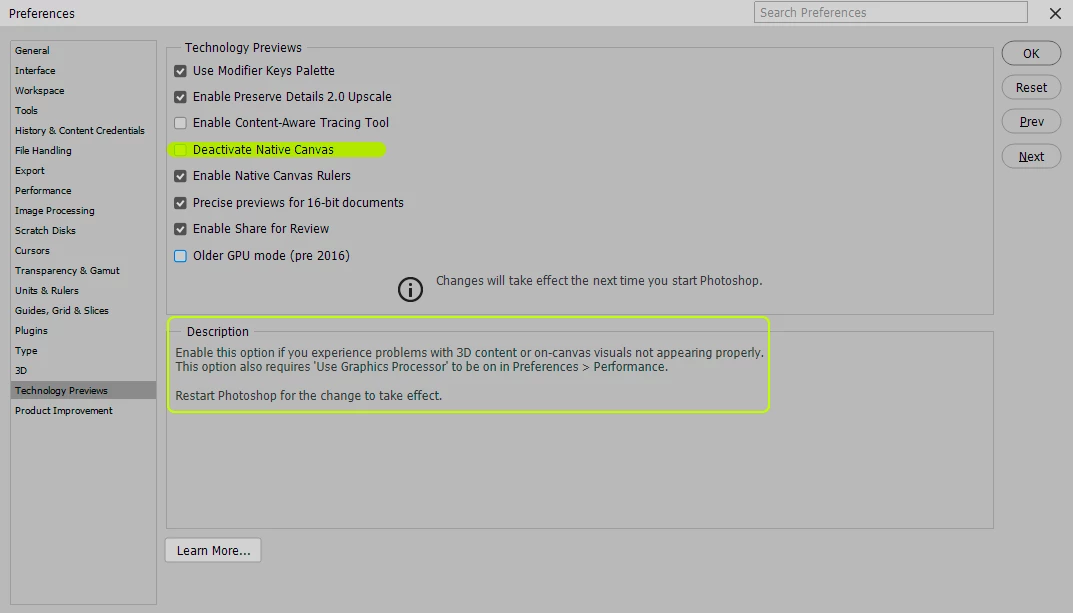
You can try to disable the GPU completely, just to quickly confirm. But I'd be curious to see if this exported correctly, IOW just an incorrect screen representation. If so, try to check this:


If applicable, there's also the "older GPU mode" checkbox below it.


If you post the contents of Help > System Info, that might give a clue to the underlying problem.

4 replies

D Fosse
Community Expert
D FosseCommunity ExpertCorrect answer
Community Expert
November 21, 2022

Agree with Barbara, this is most likely GPU-related.


You can try to disable the GPU completely, just to quickly confirm. But I'd be curious to see if this exported correctly, IOW just an incorrect screen representation. If so, try to check this:


If applicable, there's also the "older GPU mode" checkbox below it.


If you post the contents of Help > System Info, that might give a clue to the underlying problem.

Participant
November 22, 2022

When I opened Photoshop today my image was correctly cropped on the home page but still wrong on the main screen.  My GPU was not checked in preferences.  So I deactivated the native canvas and turned on the GPU, restarted Photoshop and now everything is correct!  I had exported the photo from Lightroom but I do that all the time with no problems so I am not sure if that had anything to do with it.  Thank you all for your help!

barbara_a7746676
Community Expert
Community Expert
November 21, 2022

Take a look at GPU settings in Preferences > Performance.

barbara_a7746676
Community Expert
Community Expert
November 21, 2022

It could be a GPU issue. 

Participant
November 21, 2022

Here is a photo with the background off which better shows what I was talking about.