Participant
February 12, 2024
Question

Match width of multiple layers via script/action
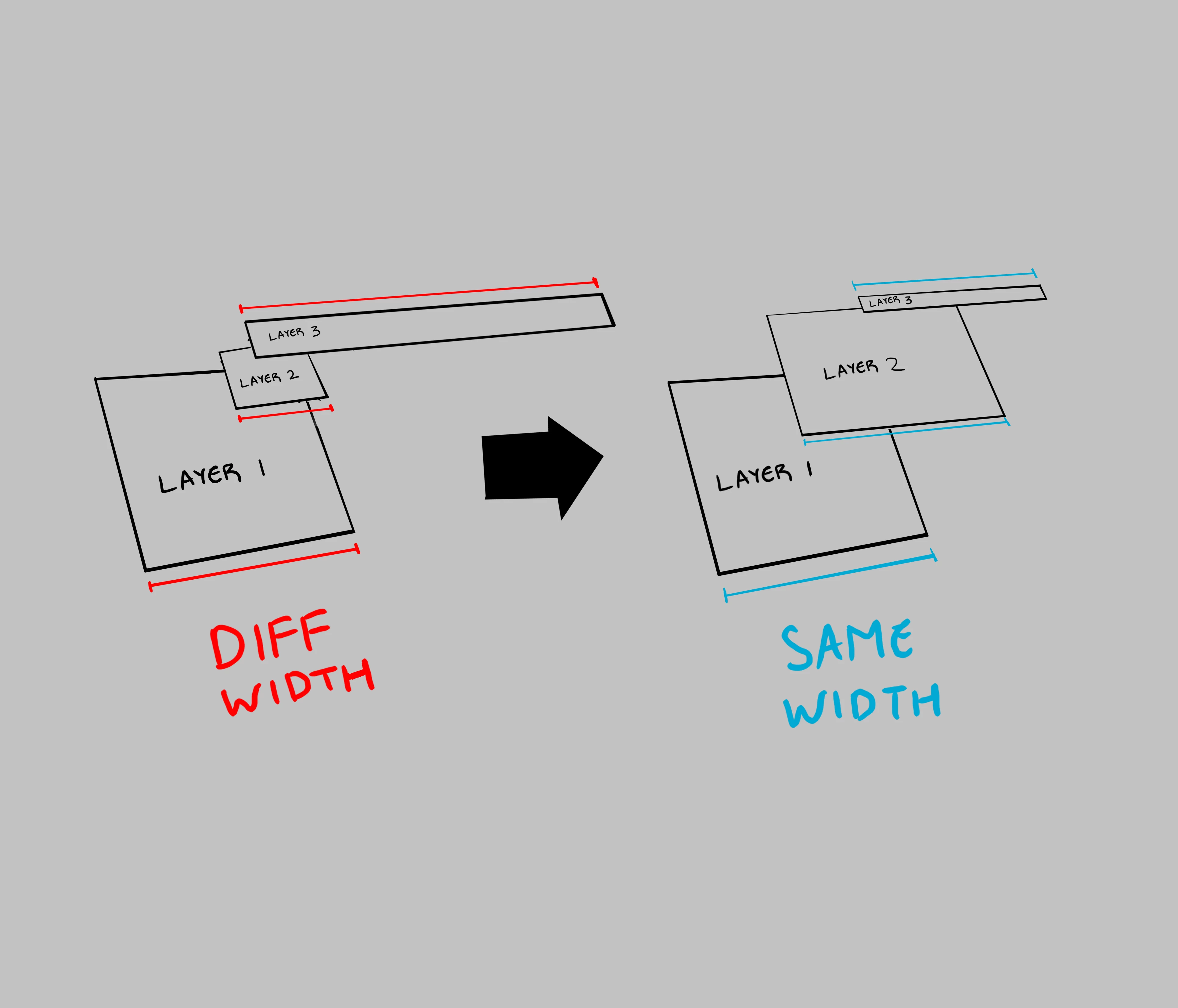
  • February 12, 2024
  • 5 replies
  • 275 views

Hello,

I was curious if there was a script or action that could perform the depicted maneuver (matching the width of multiple layers). 

Thank you!

This topic has been closed for replies.

5 replies

Stephen Marsh
Community Expert
Community Expert
February 16, 2024

@ryank45859795 


How does the script from @c.pfaffenbichler work for you?

c.pfaffenbichler
Community Expert
Community Expert
February 15, 2024

The sketch seems to indicate that the width of the lowermost Layer is the determining one, soyou cuold try below Script. 


// transform selected smart objects to width of lowermost of them;
// 2024, use it at your own risk;
if (app.documents.length > 0) {
var originalRulerUnits = app.preferences.rulerUnits;
app.preferences.rulerUnits = Units.PIXELS;
var theLayers = collectSelectedSmartObjectsBounds ();
if (theLayers.length > 1) {
var theTargetWidth = theLayers[0][3];
for (var m = 1; m < theLayers.length; m++) {
////////////////////////////////////
selectLayerByID(theLayers[m][1], false);
var layerWidth = theLayers[m][3];
var theScale = theTargetWidth / layerWidth * 100;
////////////////////////////////////
var idtransform = stringIDToTypeID( "transform" );
var idpixelsUnit = stringIDToTypeID( "pixelsUnit" );
var idpercentUnit = stringIDToTypeID( "percentUnit" );
var idoffset = stringIDToTypeID( "offset" );
var desc5 = new ActionDescriptor();
    var idfreeTransformCenterState = stringIDToTypeID( "freeTransformCenterState" );
    var idquadCenterState = stringIDToTypeID( "quadCenterState" );
    var idQCSAverage = stringIDToTypeID( "QCSAverage" );
    desc5.putEnumerated( idfreeTransformCenterState, idquadCenterState, idQCSAverage );
        var desc6 = new ActionDescriptor();
        desc6.putUnitDouble( stringIDToTypeID( "horizontal" ), idpixelsUnit, 0 );
        desc6.putUnitDouble( stringIDToTypeID( "vertical" ), idpixelsUnit, 0 );
    desc5.putObject( idoffset, idoffset, desc6 );
    desc5.putUnitDouble( stringIDToTypeID( "width" ), idpercentUnit, theScale );
    desc5.putUnitDouble( stringIDToTypeID( "height" ), idpercentUnit, theScale );
executeAction( idtransform, desc5, DialogModes.NO );
////////////////////////////////////
}
};
// reset;
app.preferences.rulerUnits = originalRulerUnits;
};
////////////////////////////////////
////// collect bounds of selected layers //////
function collectSelectedSmartObjectsBounds () {
// set to pixels;
var originalRulerUnits = app.preferences.rulerUnits;
app.preferences.rulerUnits = Units.PIXELS;
// get selected layers;
var selectedLayers = new Array;
var ref = new ActionReference();
ref.putEnumerated( charIDToTypeID("Dcmn"), charIDToTypeID("Ordn"), charIDToTypeID("Trgt") );
var desc = executeActionGet(ref);
if (desc.getBoolean(stringIDToTypeID("hasBackgroundLayer")) == true) {var theAdd =0}
else {var theAdd = 1};
if( desc.hasKey( stringIDToTypeID( 'targetLayers' ) ) ){
desc = desc.getList( stringIDToTypeID( 'targetLayers' ));
var c = desc.count;
var selectedLayers = new Array();
// run through selected layers;
for(var i=0;i<c;i++){
var theIndex = desc.getReference( i ).getIndex()+theAdd;
// get id for solid color layers;
try {
var ref = new ActionReference();
ref.putIndex( charIDToTypeID("Lyr "), theIndex ); 
var layerDesc = executeActionGet(ref);
if (layerDesc.hasKey(stringIDToTypeID('smartObject'))) {
var theName = layerDesc.getString(stringIDToTypeID('name'));
var theIdentifier = layerDesc.getInteger(stringIDToTypeID ("layerID"));
var theBounds = layerDesc.getObjectValue(stringIDToTypeID("bounds"));
var theseBounds = [theBounds.getUnitDoubleValue(stringIDToTypeID("left")), theBounds.getUnitDoubleValue(stringIDToTypeID("top")), theBounds.getUnitDoubleValue(stringIDToTypeID("right")), theBounds.getUnitDoubleValue(stringIDToTypeID("bottom"))];
var theWidth = theseBounds[2] - theseBounds[0];
selectedLayers.push([theName, theIdentifier, theseBounds, theWidth]);
}
} catch (e) {};
};
// if only one:
}else{
var ref = new ActionReference();
ref.putEnumerated( charIDToTypeID("Lyr "), charIDToTypeID("Ordn"), charIDToTypeID("Trgt") );
var layerDesc = executeActionGet(ref);
try {
if (layerDesc.hasKey(stringIDToTypeID('smartObject'))) {
var theName = layerDesc.getString(stringIDToTypeID('name'));
var theIdentifier = layerDesc.getInteger(stringIDToTypeID ("layerID"));
var theBounds = layerDesc.getObjectValue(stringIDToTypeID("bounds"));
var theseBounds = [theBounds.getUnitDoubleValue(stringIDToTypeID("left")), theBounds.getUnitDoubleValue(stringIDToTypeID("top")), theBounds.getUnitDoubleValue(stringIDToTypeID("right")), theBounds.getUnitDoubleValue(stringIDToTypeID("bottom"))];
var theWidth = theseBounds[2] - theseBounds[0];
selectedLayers = [[theName, theIdentifier, theseBounds, theWidth]]
}
} catch (e) {};
};
// reset;
app.preferences.rulerUnits = originalRulerUnits;
return selectedLayers;
};
////// collect smart objects, probably based on code by paul, mike or x //////
function collectSmartObjects2022 () {
// the file;
var myDocument = app.activeDocument;
// get number of layers;
var ref = new ActionReference();
ref.putEnumerated( charIDToTypeID("Dcmn"), charIDToTypeID("Ordn"), charIDToTypeID("Trgt") ); 
var desc = executeActionGet(ref);
// determine if background layer exists to change index;
if (desc.getBoolean(stringIDToTypeID("hasBackgroundLayer")) == true) {var theAdd = 1}
else {theAdd = 0};
var theNumber = desc.getInteger(stringIDToTypeID("numberOfLayers"));
// process the layers;
var theLayers = new Array;
for (var m = 0; m <= theNumber; m++) {
try {
var ref = new ActionReference();
ref.putIndex( charIDToTypeID( "Lyr " ), m);
var layerDesc = executeActionGet(ref);
var layerSet = typeIDToStringID(layerDesc.getEnumerationValue(stringIDToTypeID("layerSection")));
var isBackground = layerDesc.getBoolean(stringIDToTypeID("background"));
// if not layer group collect values;
if (layerSet != "layerSectionEnd" && layerSet != "layerSectionStart" && isBackground != true) {
    if(layerDesc.hasKey(stringIDToTypeID('smartObject'))) {
        var theName = layerDesc.getString(stringIDToTypeID('name'));
        var theID = layerDesc.getInteger(stringIDToTypeID('layerID'));
        var theIndex = layerDesc.getInteger(stringIDToTypeID('itemIndex'));
        var theColor = typeIDToStringID(layerDesc.getEnumerationValue(stringIDToTypeID("color")));
        var theBounds = layerDesc.getObjectValue(stringIDToTypeID("bounds"));
        var theseBounds = [theBounds.getUnitDoubleValue(stringIDToTypeID("left")), theBounds.getUnitDoubleValue(stringIDToTypeID("top")), theBounds.getUnitDoubleValue(stringIDToTypeID("right")), theBounds.getUnitDoubleValue(stringIDToTypeID("bottom"))];
        var theW = theBounds.getUnitDoubleValue(stringIDToTypeID("right")) - theBounds.getUnitDoubleValue(stringIDToTypeID("left"));
        var theH = theBounds.getUnitDoubleValue(stringIDToTypeID("bottom")) - theBounds.getUnitDoubleValue(stringIDToTypeID("top"));
        theLayers.push([theName, theIndex-theAdd, theID, theW, theH, theseBounds])
    }
};
}
catch (e) {};
};
return theLayers
};
// based on code by mike hale, via paul riggott;
function selectLayerByID(id,add){ 
add = undefined ? add = false:add 
var ref = new ActionReference();
    ref.putIdentifier(charIDToTypeID("Lyr "), id);
    var desc = new ActionDescriptor();
    desc.putReference(charIDToTypeID("null"), ref );
       if(add) desc.putEnumerated( stringIDToTypeID( "selectionModifier" ), stringIDToTypeID( "selectionModifierType" ), stringIDToTypeID( "addToSelection" ) ); 
      desc.putBoolean( charIDToTypeID( "MkVs" ), false ); 
   try{
    executeAction(charIDToTypeID("slct"), desc, DialogModes.NO );
}catch(e){
alert(e.message); 
}
};


c.pfaffenbichler
Community Expert
Community Expert
February 12, 2024

Why are the (supposed) rectangles distorted? 

Bojan Živković11378569
Community Expert
Community Expert
February 12, 2024

Actions are not suitable for this task, but scripts can be included in the actions. See answer by @Stephen Marsh.

Stephen Marsh
Community Expert
Community Expert
February 12, 2024

@ryank45859795 – I presume that there could be 2 or more layers, or is it always 3?


Would the height be scaled proportionally, or would it remain the same (distorted)?


How would the script know which is the source/key layer width? Is it always the lowest layer? Is it the active layer? Have you selected the other layers to resize and the single layer that isn't selected should set the desired width?


It would help if you listed step by step how you envision this to work.


A similar but different topic: