Participating Frequently
December 14, 2022
Answered

Measure tool ruler in javascript

  • December 14, 2022
  • 2 replies
  • 1058 views

An image is open and a fragment is being measured using the ruler tool:
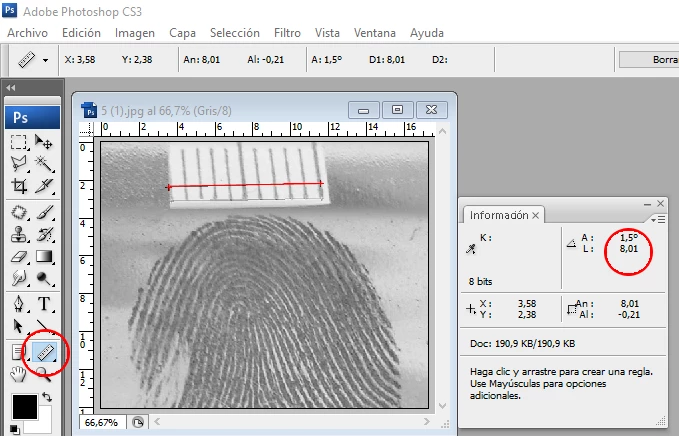
I want to resize the image to real scale through a simple javascript using the value of the measurement that appears in the information tab. My problem is that I don't know how to get the value of the rule tool in javascript.
The script is the following:

// =======================================================
var startRulerUnits = app.preferences.rulerUnits
var docRef = app.documents[0]
var w; var h; var r; var measureRulerTool

app.preferences.rulerUnits = Units.CM

measureRulerTool =  <<MEASUREMENT IN CENTIMETERS TAKEN BY THE RULER TOOL>>                                          
w= docRef.width / measureRulerTool
h = docRef.height / measureRulerTool
r = 1000

docRef.resizeImage (w, h, r)

app.preferences.rulerUnits = startRulerUnits
// =======================================================

Can any expert help me?

Many thanks to the community

This topic has been closed for replies.
Correct answer r-bin

Unfortunately it won't work in CS3.

The original (corrected code) is shown below.


function getRulerEndpoints()
    {
    try {
        var r = new ActionReference();
        r.putProperty(stringIDToTypeID("property"),  stringIDToTypeID("rulerPoints"));
        r.putEnumerated(stringIDToTypeID("document"), stringIDToTypeID("ordinal"), stringIDToTypeID("targetEnum"));

        var result = executeActionGet(r);

        if  (result.hasKey(stringIDToTypeID("points")))
            {
            var list = result.getList(stringIDToTypeID("points"));
    
            // The middle item in the list is an unused "midpoint" (currently == p0)
    
            return [
            [list.getObjectValue(0).getUnitDoubleValue(stringIDToTypeID("x")),list.getObjectValue(0).getUnitDoubleValue(stringIDToTypeID("y"))],
            [list.getObjectValue(2).getUnitDoubleValue(stringIDToTypeID("x")),list.getObjectValue(2).getUnitDoubleValue(stringIDToTypeID("y"))],
            ];
            }
        else
            return [];
        }
    catch (e) { alert("line "+e.line+"\n\n"+e); return []; }
    }

alert(getRulerEndpoints().toSource());


2 replies

Legend
December 15, 2022

Script "C:\Program Files\Adobe\Adobe Photoshop ...\Required\Straighten.jsx"

Look at getRulerEndpoints function.

Participating Frequently
December 15, 2022

I can't find this script in this folder. I guess it's because it's an old version of photoshop (CS3)
Can you paste the code here?

r-binCorrect answer
Legend
December 15, 2022

Unfortunately it won't work in CS3.

The original (corrected code) is shown below.


function getRulerEndpoints()
    {
    try {
        var r = new ActionReference();
        r.putProperty(stringIDToTypeID("property"),  stringIDToTypeID("rulerPoints"));
        r.putEnumerated(stringIDToTypeID("document"), stringIDToTypeID("ordinal"), stringIDToTypeID("targetEnum"));

        var result = executeActionGet(r);

        if  (result.hasKey(stringIDToTypeID("points")))
            {
            var list = result.getList(stringIDToTypeID("points"));
    
            // The middle item in the list is an unused "midpoint" (currently == p0)
    
            return [
            [list.getObjectValue(0).getUnitDoubleValue(stringIDToTypeID("x")),list.getObjectValue(0).getUnitDoubleValue(stringIDToTypeID("y"))],
            [list.getObjectValue(2).getUnitDoubleValue(stringIDToTypeID("x")),list.getObjectValue(2).getUnitDoubleValue(stringIDToTypeID("y"))],
            ];
            }
        else
            return [];
        }
    catch (e) { alert("line "+e.line+"\n\n"+e); return []; }
    }

alert(getRulerEndpoints().toSource());


Legend
December 14, 2022

I haven't used this but Photoshop Scripting Reference has info about using measurements, so the methods do exist.

Participating Frequently
December 15, 2022

I have already consulted this guide and others. I have not found examples or clear help on how to get the value I need.
It is possible that it is explained in the guides and that I do not know how to find it because of my little experience. For that reason I need the help of some expert.

Thank you very much for your interest

Legend
December 15, 2022

Welcome to Adobe scripting. A lot of it is like this, little clear documentation or examples. Best bet is to learn how to write test code, use reflect, and be patient. Every one of use has had to figure a lot of things out. Have you tried a test script to see if you can get it working?