
Measuring Grey Intensity
Hello forum,
Here is my ultimate goal: I have an image that I want to be able to quantify the amount or intensity of purple on the image. There are other colors present and there are different shades or purple throughout the image.
I was able to isolate just the purple on the image but going to
Select>Color Range>
Then selecting only the purple on the image-- it changed it from a colored image to now greyscale-- where the darkest shades of purple are dark grey vs little amounts of purple which are a lighter grey.
Now I want to be able to quantify the intensity of the grey on the ENTIRE image (more specifically the entire dish in the image)
Is there any way I can do this? I have Photoshop CS6. Also is there a specific format my image needs to be in order to start analyzing-- I found a great approach that I could use already (found here Photoshop Extended: Performing a comparative analysis of bands | lynda.com - YouTube))
https://www.youtube.com/watch?v=v5xLSXMHFr0however whenever I go to
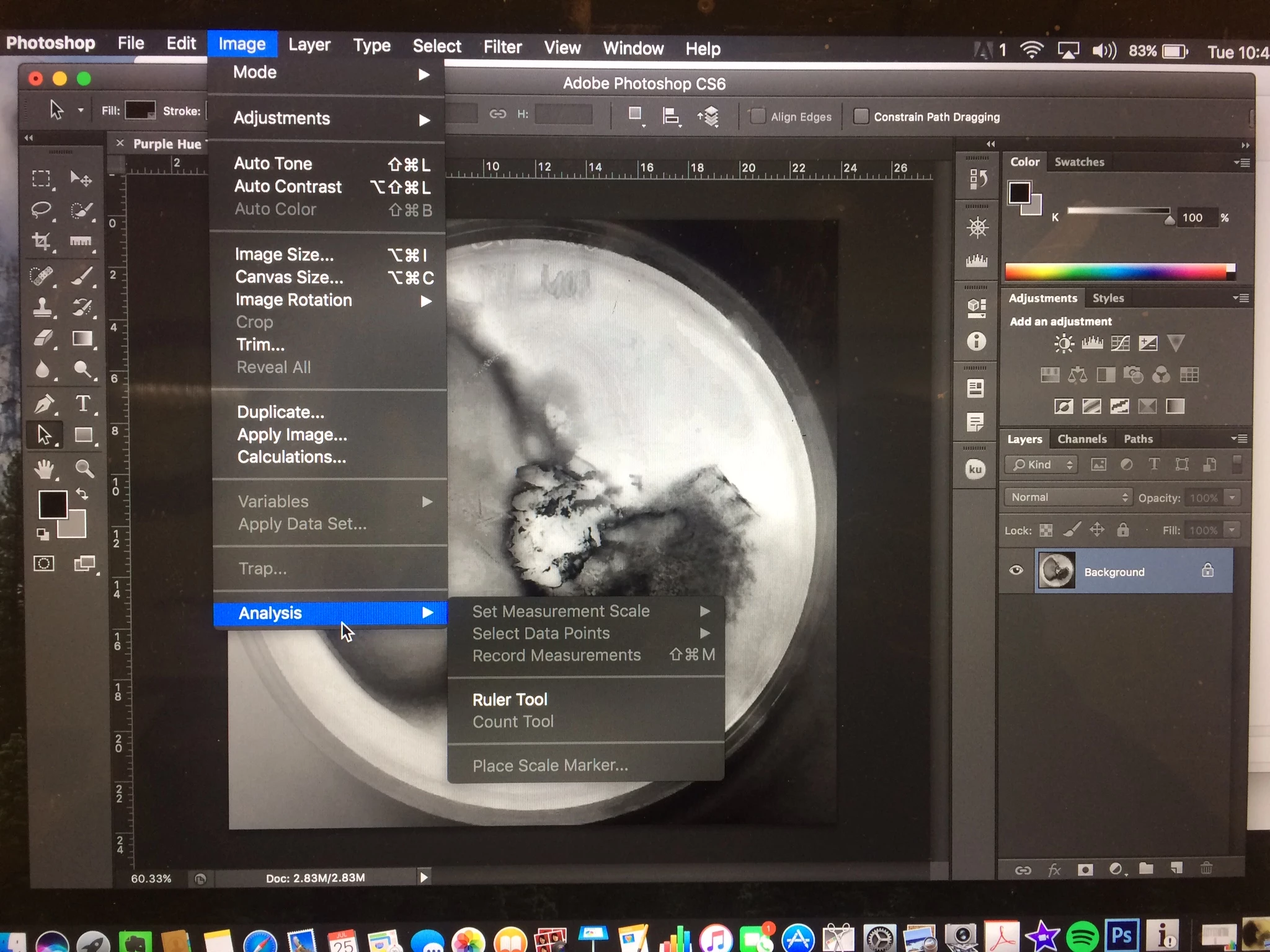
Image>Analysis>Set Measurements Scale (or any other selection in within that tab) it remains grey meaning I cannot select that item. The only team I can select is ruler tool which is not what I want. Here is an image to show you more clearly what I'm talking about (the background is the image I want to analyze)
I hope this makes sense-- let me know if you need clarification.
 AdChoices