
gtsolid
Known Participant
September 29, 2017
Answered

Measuring object

  • September 29, 2017
  • 2 replies
  • 466 views

Hello

on a image i have, i know that a particular is about 10mm.

i would to use ruler tool in order to find other dimensions. How can i do this?

    This topic has been closed for replies.
    Correct answer ahmed_waheib

    Using ruler tool from View>Rulers 

    but if you have an object and you want to check it inside the photoshop file you have to click on Edit>Free Transform

    Then the below will appear to you and you can know what is the dimensions of the object inside the photoshop file.

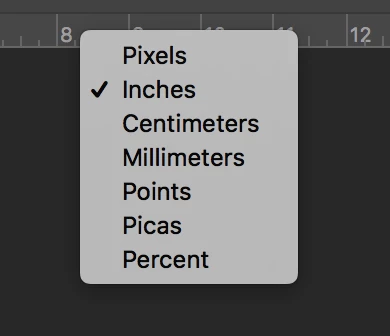
    In the ruler, you can change it if its cm, mm, px or etc. Right click on the ruler bar and you will see as the below
    2 replies

    Chuck Uebele
    Community Expert
    Community Expert
    September 29, 2017

    Take the ruler tool and measure the object you know the size of. I measured the bottom of the big rectangle. Then go to Image>Analysis>Set Measurment Scale>Custom. Enter in the size of the line from the line tool's menu bar into the UI. Then set how big it's suppose to be. I put 10, then "mm" as the units.

    Next draw a new line on what you want to measure. Then select Image>Analysis>Record Measurement. The size will show in the lenght of the table at the bottom of the screen.

    ahmed_waheib
    ahmed_waheibCorrect answer
    Inspiring
    September 29, 2017

    Using ruler tool from View>Rulers 

    but if you have an object and you want to check it inside the photoshop file you have to click on Edit>Free Transform

    Then the below will appear to you and you can know what is the dimensions of the object inside the photoshop file.

    In the ruler, you can change it if its cm, mm, px or etc. Right click on the ruler bar and you will see as the below