Participant
February 6, 2017
Answered

Merging 3d objects

  • February 6, 2017
  • 6 replies
  • 9373 views

How to combine two 3d objects to make them 1 object      

not just the same space and layer

i want it as 1 object

same materials

and same options

    This topic has been closed for replies.
    Correct answer davescm

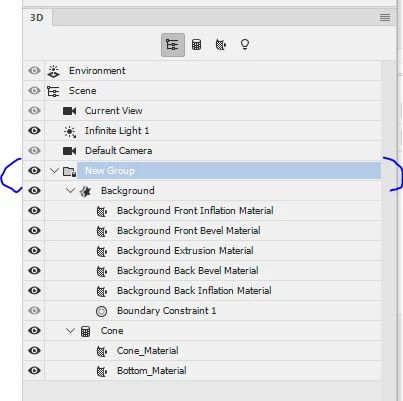
    If they are both in the same 3D layer you can select both in the 3D panel and then right click and choose "Group objects"

    The two objects will move /scale  together, with a single control if you select the group or individually if you select either object.

    You can set the material to use the same texture in both models. As in this simple example of a cube and a cone - both in a group and set to use the same yellowish diffuse texture
    I hope that helps you

    Dave

    6 replies

    Participating Frequently
    April 28, 2023

    You can also create 3D objects in Illustrator and import them into Dimension.  It's a huge time saver! 

    RWM165
    Participant
    May 26, 2020

    Good morning I am drawing the path of a bottle in Ai, c&p into Ps, make it 3D, then I path the shape of the inside edge of the bottle, c&p that into Ps and make that 3D too. when I merge they are in two different placed, how do I get them to be in the same position so when I import them into Dimension I can choose glass for the outer layer & a wine colour for the inner layer

    Thank you 

    Kat Gilbert
    Legend
    February 7, 2017

    There are more than one helpful (not correct) answer in this forum.

    Kat Gilbert
    Legend
    February 7, 2017

    You can also go to the 3D area in tool bar and click on "Merge 3D Layers." after you hold down the Command key and right click on the 3D layers you wish to merge.

    JRfromPTC
    Inspiring
    February 6, 2017

    The only way to do it is to export the 3D object into a program like Blender (free) or any other 3D application. Merge it there, and export it back to Photoshop.

    May I ask why you want one 3D object? Sometimes grouping several objects together can be as efficient, if not more.

    Participant
    April 10, 2022

    Photoshop or Dimension you said?

    JJMack
    Community Expert
    Community Expert
    February 6, 2017

    They will not become one object they will be objects in the same scene. Here I merge a sphere, 3D layer with a cylinder 3d layer then merged a ring 3D layer  into the  merged 3D layers.  I then  size each and position each object relative to each other in the scene and animated the scene objects

    .

    JJMack
    davescm
    Community Expert
    davescmCommunity ExpertCorrect answer
    Community Expert
    February 6, 2017

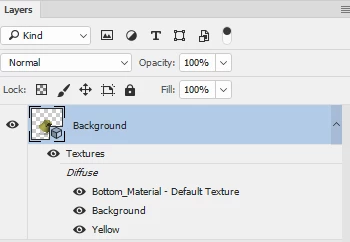
    If they are both in the same 3D layer you can select both in the 3D panel and then right click and choose "Group objects"

    The two objects will move /scale  together, with a single control if you select the group or individually if you select either object.

    You can set the material to use the same texture in both models. As in this simple example of a cube and a cone - both in a group and set to use the same yellowish diffuse texture
    I hope that helps you

    Dave

    Participating Frequently
    November 30, 2020

    Hello,

    What about if I want to apply a graphic to this group (an illustration)? I am trying to map an image to a complex 3d object created of several shapes, and this cannot be done if the different shapes are not one unique object.

    Please let me know in case there is a simple solution.