Participating Frequently
July 11, 2019
Answered

Merging Similar Photos

  • July 11, 2019
  • 4 replies
  • 683 views

Hi --

I have around 100 photos taken from the same position on a tripod of a street corner. The only thing that changes are the people that pass by. My plan is to merge the photos together and create a montage of people. I could do this by masking each photo one-by-one but that feels time consuming. I thought blend modes might work but that sacrifices the entire look of the image. Is there a plug-in or a command that could make this process simple? For example, I'm guessing you could make a script that analyzes two similar photos and makes a selection of the just the differences.
This topic has been closed for replies.
Correct answer Norman Sanders

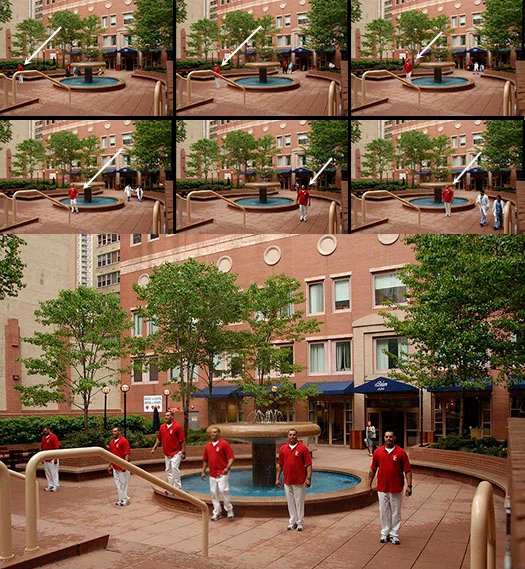
This is an abbreviated version of what you have in mind. (Done in preparation for an image with many people)

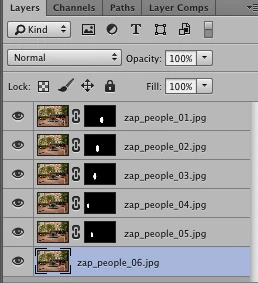
The images were stacked in register (Auto-align Layers) ad then masked as shown, The mask in each case does not require a tight silhouette. It cuts down on the brushwork time considerably. I suggest you test this with a half-dozen images in your set. Be aware that, in your project, overprinting people will produce some odd effects. Avoid it

4 replies

Semaphoric
Community Expert
Community Expert
July 12, 2019

Ooops, I see I misread your original post

Norman Sanders
Norman SandersCorrect answer
Legend
July 12, 2019

This is an abbreviated version of what you have in mind. (Done in preparation for an image with many people)

The images were stacked in register (Auto-align Layers) ad then masked as shown, The mask in each case does not require a tight silhouette. It cuts down on the brushwork time considerably. I suggest you test this with a half-dozen images in your set. Be aware that, in your project, overprinting people will produce some odd effects. Avoid it

Semaphoric
Community Expert
Community Expert
July 12, 2019

You can do this by placing the images into a Stack - see Image stacks in Adobe Photoshop

Also search the Web for "Photoshop Stacks Object Removal".

Sahil.Chawla
Adobe Employee
Adobe Employee
July 11, 2019

Hi Samuel,

You can create a panorama merge, please check the steps here: Create and edit a panorama in Photoshop

Regards,
Sahil

Participating Frequently
July 11, 2019

I thought that might work but photomerge seems to get confused if the images are taken from the same location and angle. The camera's position has not moved in my case

re: last post