
Plainairpainter
Participant
March 16, 2018
Answered

Metadata tags and color profile issues when exporting vs. saving?

  • March 16, 2018
  • 1 reply
  • 1265 views

In the psd doc I add my metadata info including tags and star ratings. If I export this as a jpg and check metadata option “copyright and contact info” and color space options “convert to sRGB” and “embed color profile” and save to a folder, then when I move the cursor over the image before opening it, (to check if it worked as planned), the tags are missing and the image says “unrated”. If I reopen the jpg, sure enough, the stars have been removed, but the tags are still there.  If, instead of exporting once again, I save the jpg instead, then when I hover over with the cursor, the tags and stars are there and when I open the jpg, they are still there in the file info. But, by saving and thus overwriting the exported version, have I now unembeded the color profile and not converted to sRGB? If it is a choice between tags and color for images to post on my website, I will choose color, but why does this happen?
This topic has been closed for replies.
Correct answer Abambo

As they say at IBM: "It's not a bug, it's a feature!" And for this issue it's even true.

Saving for the web (or export as) strips of all information except those that you chose to keep. The "save as" keeps everything as it is and saves just in a new file format. If a feature is not supported by that file format, it's silently stripped.

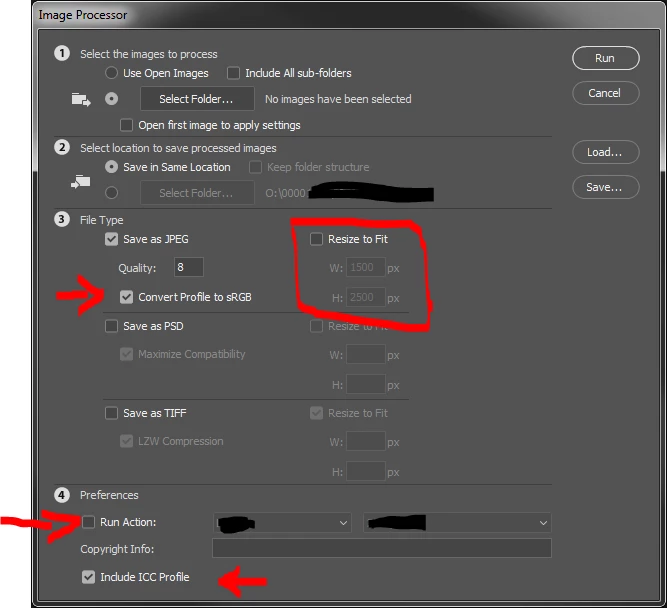
Try the image processor (file->scripts or from Bridge Tools->Photoshop):

You have there a bunch of options that may help, but keep all the metadata. It's thought to be used on a bunch of files as a batch convert. We us it to convert developed RAW files to JPEG or to resize a bunch of files to a certain size. It keeps the aspect if you do a resize, the "Resize to fit" gives the maxima. You can in addition run an action before converting (for example to add a watermark).

1 reply

Derek Cross
Community Expert
Community Expert
March 16, 2018

Exporting is for saving for web and has been deprecated in recent versions of Photoshop. I also converts any image to 72ppi.

Plainairpainter
Participant
March 16, 2018

Thanks Derek, I am using photoshop cc and am not using the “save for web (legacy)“ option, but the “export as” option, then saving as a jpg. Yes, I also reduce to 72 dpi. But I still have the issues I mentioned above.

Abambo
Community Expert
AbamboCommunity ExpertCorrect answer
Community Expert
March 16, 2018

As they say at IBM: "It's not a bug, it's a feature!" And for this issue it's even true.

Saving for the web (or export as) strips of all information except those that you chose to keep. The "save as" keeps everything as it is and saves just in a new file format. If a feature is not supported by that file format, it's silently stripped.

Try the image processor (file->scripts or from Bridge Tools->Photoshop):

You have there a bunch of options that may help, but keep all the metadata. It's thought to be used on a bunch of files as a batch convert. We us it to convert developed RAW files to JPEG or to resize a bunch of files to a certain size. It keeps the aspect if you do a resize, the "Resize to fit" gives the maxima. You can in addition run an action before converting (for example to add a watermark).

ABAMBO | Hard- and Software Engineer | Photographer