joecos55
Inspiring
January 30, 2017
Answered

Missing background to transparent gradient, in gradien tool

  • January 30, 2017
  • 2 replies
  • 8466 views

I am missing what would be the second gradient option in the gradtool selection area. Where it's black on top transparent on the bottom. I have tried resetting several times and that one gradient is gone. I look at the list vgradienta and background to transparent is not there.  Any ideas
    This topic has been closed for replies.
    Correct answer Ronald Keller

    Ronald

    thank you, that helps some, now my second option is is white on top it used to be black.  Can I change that with the options below the gradients?


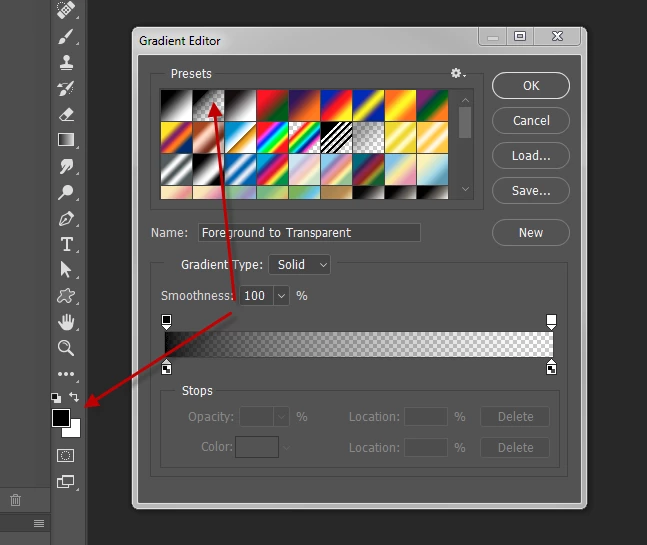
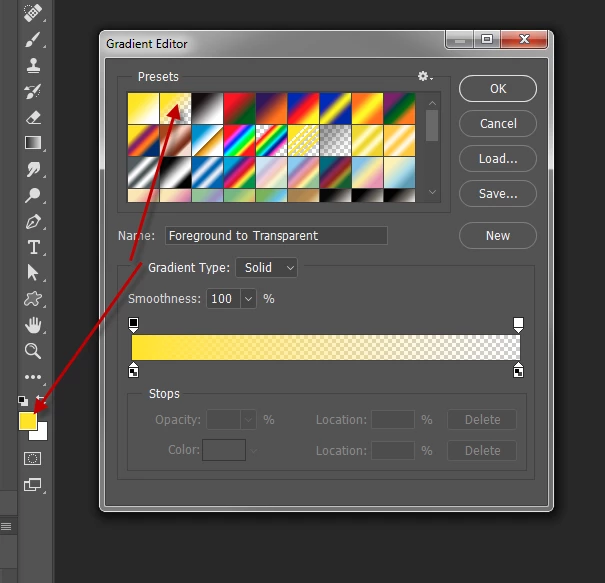
    Not sure if I understand what you mean by 'second option'. If you mean the second gradient in the list then you must understand that this 'thumbnail' changes with the current foreground color.

    If the current foreground color is, say yellow, then the top color is yellow (see screenshot).

    The top color will be black if the current foreground color is black and so on.

    In other words, while all the swatches are static, the first two however change with the active foreground color.

    2 replies

    Terri Stevens
    Legend
    January 30, 2017

    What that is, is a foreground to transparency gradient. So if your foreground is white it will be white to transparent. To get black to transparent make your foreground color black.

    joecos55
    joecos55Author
    Inspiring
    January 30, 2017

    I will try building one thanks

    Joe Cosentino
    Legend
    January 30, 2017

    As Terri pointed out there is no Background to Transparency gradient. The second gradient in the list is FOREground to transparency gradient and it changes with the foreground color (of course.)

    davescm
    Community Expert
    Community Expert
    January 30, 2017

    If you click on the little cogwheel next to the gradients you can load / save and reset the gradients or change the set

    You can also make the gradient you want by opening the gradient editor (by double clicking on a gradient preset, and setting the top stops to 0% and 100% opacity. The top stops control the opacity, the bottom stops control the colour.

    Dave

    joecos55
    joecos55Author
    Inspiring
    January 30, 2017

    Thank you. I tried the reset I may have to build a new one but I don't understand why it's not I. The list of gradients. 

    Joe Cosentino
    Trevor.Dennis
    Community Expert
    Community Expert
    January 31, 2017

    joecos55 wrote:

    Thank you. I tried the reset I may have to build a new one but I don't understand why it's not I. The list of gradients.

    I am sure that gradient is hard wired and can not be permanently deleted.  If not in it already, switch to the Essentials workspace, and then Reset Essentials workspace.  If all else fails, reinstall Photoshop.