Participant
November 30, 2018
Question

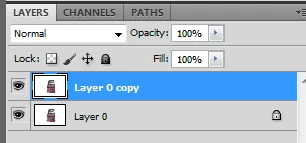
missing control box next to visible box in layer pallet

  • November 30, 2018
  • 4 replies
  • 291 views

    This topic has been closed for replies.

    4 replies

    Dan Rodney
    Community Expert
    Community Expert
    November 30, 2018

    If you're looking for the link button, you no longer need it as much as you used to. You can select multiple layers now by clicking on layers while holding Shift (to select all those in between) or Control (PC) or Command (Mac) to select multiple individual layers. Alternatively, you can group layers. I rarely need to link layers anymore with these other (newer) methods.

    While the column of link buttons is now gone, you can still link layers. Select multiple layers and click the Link button at the bottom of the Layers panel.

    — Adobe Certified Expert & Instructor at Noble Desktop | Web Developer, Designer, InDesign Scriptor
    Sebastian Bleak
    Community Expert
    Community Expert
    November 30, 2018

    What version are you using?

    mglush
    Community Expert
    Community Expert
    November 30, 2018

    Or are you looking for the Layer Styles Dialog box?

    Daniel E Lane
    Inspiring
    November 30, 2018

    Are you meaning that there is no mask on the layers?

    michelew83603738
    Community Expert
    Community Expert
    November 30, 2018

    What do you mean control box? Are you confusing it with the lock toggle that is next to the visibility toggle that is in Illustrator?