Attiwind
Inspiring
April 23, 2019
Answered

Missing functions (text and rectangle selection transforms)

  • April 23, 2019
  • 3 replies
  • 1009 views

It no longer highlights the selection of the text and neither does the box with corners in the transformation of an element. What is going on???

This topic has been closed for replies.
Correct answer

Hi

What exact version of Photoshop and OS do you have, if it's the CC2019, 2 things to try

Set the Drawing Mode to Basic in preferences > performance and restart Photoshop
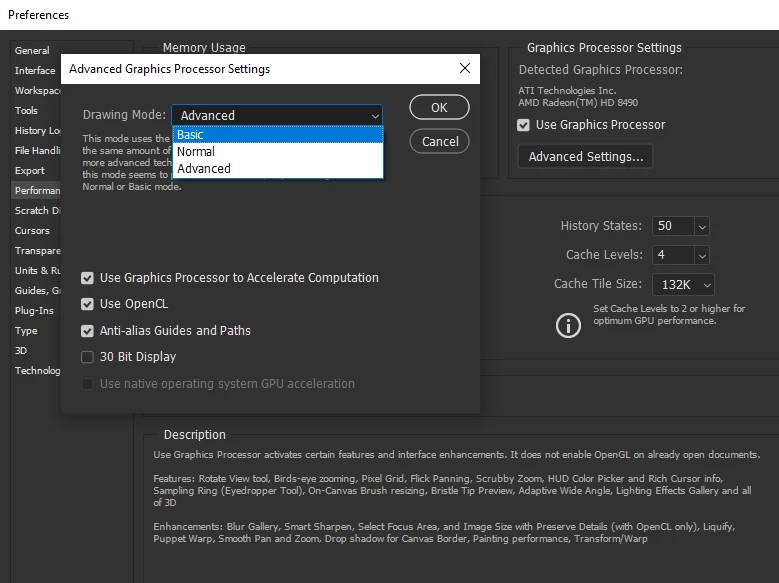
If that doesn't help try enabling Legacy Compositing again restart PS

3 replies

Correct answer
April 23, 2019

Hi

What exact version of Photoshop and OS do you have, if it's the CC2019, 2 things to try

Set the Drawing Mode to Basic in preferences > performance and restart Photoshop

If that doesn't help try enabling Legacy Compositing again restart PS

Attiwind
AttiwindAuthor
Inspiring
April 23, 2019

ok. Yes, I have Photoshop CC 2019 (last release), MacOS 10.12.6

I set the drawing mode to BASIC in preferences / performance and now everything works regularly.

Thanks Dave

JJMack
Community Expert
Community Expert
April 23, 2019

Can you clue us in as to what or which "IT" you are writing about or post a screen capture and note  where and what is missing?  What page are you on?

JJMack
davescm
Community Expert
Community Expert
April 23, 2019

How exactly are you selecting the text and transforming:

Ctrl+T - the transform box should show

The move tool - make sure that show transform controls is checked in the options bar

Note - you are not using Select - Transform Selection are you. That alters the selection area itself not the contents.

Dave