
Inspiring
September 12, 2021
Answered

Missing lens profiles in Camera Raw

  • September 12, 2021
  • 1 reply
  • 2128 views

Hello,


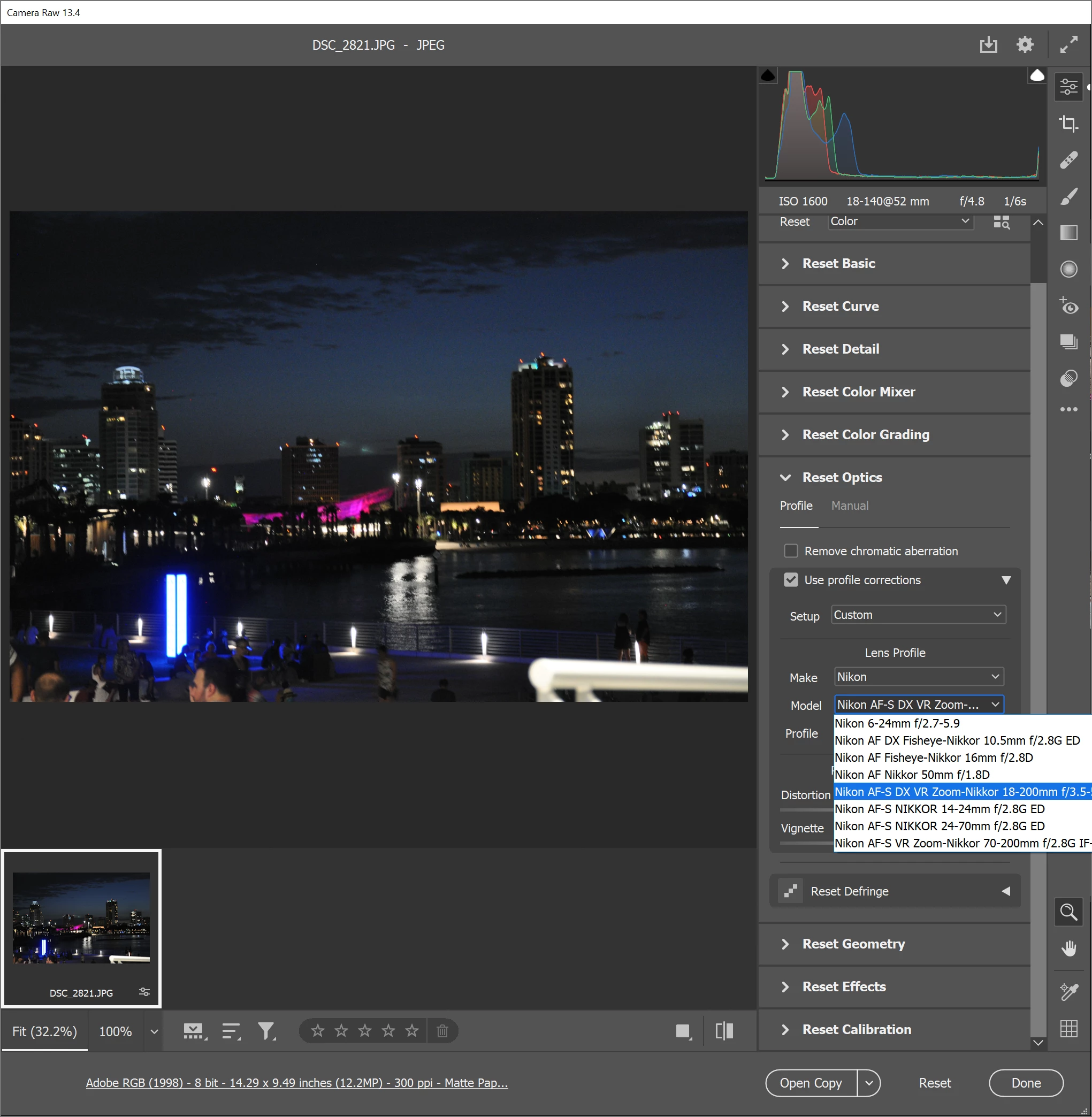
I'm trying to use camera raw to edit a jpg from my wife's Nikon D90.  The image in question was shot with a AF-S DX NIKKOR 18-140mm f/3.5-5.6G ED VR lens, which is on the supported lens list.  I'm using camera raw 13.4 and all my adobe stuff was installed with the creative cloud app and set to auto update.


The problem is that there are only 6 nikon lenses listed in the "use profile corrections" section under Optics.    Where are the other Nikon lenses?


This topic has been closed for replies.
Correct answer Jeff Arola

Camera raw provides very few lens correction profiles for jpegs.


You can open up the jpeg into photoshop proper and use Filter>Lens Correction.

1 reply

Jeff Arola
Community Expert
Jeff ArolaCommunity ExpertCorrect answer
Community Expert
September 18, 2021

Camera raw provides very few lens correction profiles for jpegs.


You can open up the jpeg into photoshop proper and use Filter>Lens Correction.