
Missing library for Photoshop CS6 on Mojave
Hello! Please do not reply with any variant of "CS6 is too old, you need to upgrade to use the latest OS". I work in software, so I know plenty about why old software may not work on newer OSes. I promise, I really do.
That said, some people have had success running Photoshop CS6 on Mac OS 10.14 Mojave. I've done all the suggested things here: Mac mojave update photoshop CS6 not opening
But I'm pretty sure none of that is applicable to the particular error I'm getting. Photoshop fails to open entirely and produces this dialog:
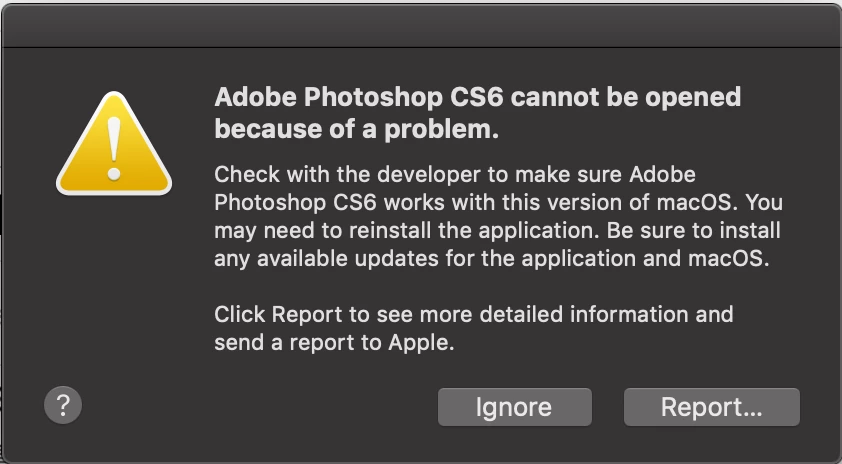
When sending a bug report, the information below is available. It looks like a dynamic library within the Photoshop app package is missing. Googling reveals no one else posting this specific problem. Has anyone seen this? I suspect it could be fixed by reinstalling, but I thought I'd ask first before I bothered digging up my DVD and the drive to read it (can't remember the last time I used either, I know they're around here somewhere...)
These seem to be the crucial lines:
- Termination Reason:
- DYLD, [0x1] Library missing
Dyld Error Message:
Library not loaded: @executable_path/../Frameworks/WRServices.framework/Versions/A/WRServices
Referenced from: /Applications/Adobe Photoshop CS6/Adobe Photoshop CS6.app/Contents/MacOS/Adobe Photoshop CS6
Reason: image not found
Thanks!
Full bug report log:
| Process: | Adobe Photoshop CS6 [4935] |
| Path: | /Applications/Adobe Photoshop CS6/Adobe Photoshop CS6.app/Contents/MacOS/Adobe Photoshop CS6 |
| Identifier: | com.adobe.Photoshop |
| Version: | 13.0.6 (13.0.6.54) |
| Code Type: | X86-64 (Native) |
| Parent Process: | ??? [1] |
| Responsible: | Adobe Photoshop CS6 [4935] |
| User ID: | 501 |
| Date/Time: | 2019-08-15 21:22:19.744 -0400 |
| OS Version: | Mac OS X 10.14.6 (18G84) |
| Report Version: | 12 |
| Anonymous UUID: | 97CBAA6D-DBA8-11EB-04AA-DD9866A27BDB |
| Sleep/Wake UUID: | 55980D07-874C-4E77-B93A-5CB0FB14671D |
Time Awake Since Boot: 14000 seconds
| Time Since Wake: | 2300 seconds |
System Integrity Protection: enabled
| Crashed Thread: | 0 |
| Exception Type: | EXC_CRASH (SIGABRT) |
| Exception Codes: | 0x0000000000000000, 0x0000000000000000 |
| Exception Note: | EXC_CORPSE_NOTIFY |
| Termination Reason: | DYLD, [0x1] Library missing |
Application Specific Information:
dyld: launch, loading dependent libraries
Dyld Error Message:
Library not loaded: @executable_path/../Frameworks/WRServices.framework/Versions/A/WRServices
Referenced from: /Applications/Adobe Photoshop CS6/Adobe Photoshop CS6.app/Contents/MacOS/Adobe Photoshop CS6
Reason: image not found
Binary Images:
| 0x100000000 - | 0x103669fe7 +com.adobe.Photoshop (13.0.6 - 13.0.6.54) <9A2B6581-BDCA-3447-8DD5-B1D09072B3EF> /Applications/Adobe Photoshop CS6/Adobe Photoshop CS6.app/Contents/MacOS/Adobe Photoshop CS6 | |
| 0x103d2b000 - | 0x103d57ff7 +libtbb.dylib (0) <57655978-A378-BE1E-7905-7D7F951AD6F7> /Applications/Adobe Photoshop CS6/Adobe Photoshop CS6.app/Contents/Frameworks/libtbb.dylib | |
| 0x103d6e000 - | 0x103d7cff3 +libtbbmalloc.dylib (0) <CB038B96-2999-5EB1-E26A-7720A7A8F8CD> /Applications/Adobe Photoshop CS6/Adobe Photoshop CS6.app/Contents/Frameworks/libtbbmalloc.dylib | |
| 0x103d90000 - | 0x103daaff7 +com.adobe.ahclientframework (1.7.0.56 - 1.7.0.56) <C1C5DE5C-39AB-0871-49A6-FA3449D39B8A> /Applications/Adobe Photoshop CS6/Adobe Photoshop CS6.app/Contents/Frameworks/ahclient.framework/Versions/A/ahclient | |
| 0x103db3000 - | 0x103f7cfff +com.adobe.owl (AdobeOwl version 5.0.4 - 5.0.4) <0FA698D2-CE7E-3C5A-B3D2-D9859A8612A0> /Applications/Adobe Photoshop CS6/Adobe Photoshop CS6.app/Contents/Frameworks/AdobeOwl.framework/Versions/A/AdobeOwl | |
| 0x103fbe000 - | 0x104404ff7 +com.adobe.MPS (AdobeMPS 5.8.0.19463 - 5.8.0.19463) <8A4BA3B2-6F6A-3958-ABDE-C3E8F21373B0> /Applications/Adobe Photoshop CS6/Adobe Photoshop CS6.app/Contents/Frameworks/AdobeMPS.framework/Versions/A/AdobeMPS | |
| 0x104480000 - | 0x1047d9ff7 +com.adobe.AGM (AdobeAGM 4.26.20.20743 - 4.26.20.20743) <27080135-E835-75EF-FF42-15299479FDA1> /Applications/Adobe Photoshop CS6/Adobe Photoshop CS6.app/Contents/Frameworks/AdobeAGM.framework/Versions/A/AdobeAGM | |
| 0x104842000 - | 0x104ba3fef +com.adobe.CoolType (AdobeCoolType 5.10.33.20743 - 5.10.33.20743) <758DF893-C0F4-5769-53C5-7C80FC9111FB> /Applications/Adobe Photoshop CS6/Adobe Photoshop CS6.app/Contents/Frameworks/AdobeCoolType.framework/Versions/A/AdobeCoolType | |
| 0x104bf0000 - | 0x104c18ff7 +com.adobe.BIBUtils (AdobeBIBUtils 1.1.01 - 1.1.01) <BFA061BE-7598-275D-D3F7-5842674E367E> /Applications/Adobe Photoshop CS6/Adobe Photoshop CS6.app/Contents/Frameworks/AdobeBIBUtils.framework/Versions/A/AdobeBIBUtils | |
| 0x104c1f000 - | 0x104c4bfff +com.adobe.AXE8SharedExpat (AdobeAXE8SharedExpat 3.7.101.18636 - 3.7.101.18636) <488DF1F7-A643-5168-706A-498A0322A87E> /Applications/Adobe Photoshop CS6/Adobe Photoshop CS6.app/Contents/Frameworks/AdobeAXE8SharedExpat.framework/Versions/A/AdobeAXE8SharedExpat | |
| 0x105752000 - | 0x1057bc6ef dyld (655.1.1) <D3E77331-ACE5-349D-A7CC-433D626D4A5B> /usr/lib/dyld | |
| 0x7fff49fe1000 - | 0x7fff49fe5fff com.apple.agl (3.3.2 - AGL-3.3.2) <03320890-819C-38A2-AD45-78F1473E693F> /System/Library/Frameworks/AGL.framework/Versions/A/AGL | |
| 0x7fff4b5c4000 - | 0x7fff4c379ffb com.apple.AppKit (6.9 - 1671.60.107) <DA722801-0527-3265-ADAE-BB2966649C7C> /System/Library/Frameworks/AppKit.framework/Versions/C/AppKit | |
| 0x7fff4d236000 - | 0x7fff4d236fff com.apple.Carbon (158 - 158) <56AD06AA-7BB4-3F0B-AEF7-9768D0BC1C98> /System/Library/Frameworks/Carbon.framework/Versions/A/Carbon | |
| 0x7fff4dfad000 - | 0x7fff4e3f1fe7 com.apple.CoreFoundation (6.9 - 1575.17) <EE7948FC-FDA8-3F95-A1E0-69FAED5D81AA> /System/Library/Frameworks/CoreFoundation.framework/Versions/A/CoreFoundation | |
| 0x7fff5022f000 - | 0x7fff505dcfff com.apple.Foundation (6.9 - 1575.17) <20150BA3-74D6-3991-AD22-52735FAD0E24> /System/Library/Frameworks/Foundation.framework/Versions/C/Foundation | |
| 0x7fff508e7000 - | 0x7fff50976fff com.apple.framework.IOKit (2.0.2 - 1483.260.4) <8A90F547-86EF-3DFB-92FE-0E2C0376DD84> /System/Library/Frameworks/IOKit.framework/Versions/A/IOKit | |
| 0x7fff57c3d000 - | 0x7fff57c4cffb com.apple.opengl (17.7.3 - 17.7.3) <94B5CF34-5BD6-3652-9A8C-E9C56E0A9FB4> /System/Library/Frameworks/OpenGL.framework/Versions/A/OpenGL | |
| 0x7fff58a4f000 - | 0x7fff58ca6ff7 com.apple.QuartzCore (1.11 - 701.14) <33E846BE-1794-3186-9BF2-6ADF62C782A3> /System/Library/Frameworks/QuartzCore.framework/Versions/A/QuartzCore | |
| 0x7fff594db000 - | 0x7fff597dbfff com.apple.security (7.0 - 58286.270.3.0.1) <DF7677A7-9765-3B6A-9D1C-3589145E4B65> /System/Library/Frameworks/Security.framework/Versions/A/Security | |
| 0x7fff59ca5000 - | 0x7fff59caaffb org.twain.dsm (1.9.5 - 1000) <AAC7E204-E0B1-36D7-8DB9-C79709954044> /System/Library/Frameworks/TWAIN.framework/Versions/A/TWAIN | |
| 0x7fff77930000 - | 0x7fff77986ff3 libcups.2.dylib (462.12) <095619DC-9233-3937-9E50-5F10D917A40D> /usr/lib/libcups.2.dylib |
Model: MacBookPro11,4, BootROM 194.0.0.0.0, 4 processors, Intel Core i7, 2.5 GHz, 16 GB, SMC 2.29f24
Graphics: kHW_IntelIrisProItem, Intel Iris Pro, spdisplays_builtin
Memory Module: BANK 0/DIMM0, 8 GB, DDR3, 1600 MHz, 0x80AD, 0x484D54343147533642465238412D50422020
Memory Module: BANK 1/DIMM0, 8 GB, DDR3, 1600 MHz, 0x80AD, 0x484D54343147533642465238412D50422020
AirPort: spairport_wireless_card_type_airport_extreme (0x14E4, 0x152), Broadcom BCM43xx 1.0 (7.77.61.2 AirPortDriverBrcmNIC-1305.8)
Bluetooth: Version 6.0.14d3, 3 services, 18 devices, 1 incoming serial ports
Network Service: USB 10/100/1000 LAN, Ethernet, en9
Network Service: Wi-Fi, AirPort, en0
Network Service: Thunderbolt Bridge, Ethernet, bridge0
USB Device: USB 3.0 Bus
USB Device: Internal Memory Card Reader
USB Device: Ultra Fit
USB Device: Apple Internal Keyboard / Trackpad
USB Device: Bluetooth USB Host Controller
Thunderbolt Bus: MacBook Pro, Apple Inc., 27.1
 AdChoices