

RichardJB
Participant
February 3, 2021
Beantwortet

Missing quick selection tool

  • February 3, 2021
  • 2 Antworten
  • 4994 Ansichten

The 'quick selection tool' does not appear on my tool bar. I've moved it to the 'Extra Tools' area of the 'customize toolbar' screen & clicked 'done' but I still do not see it in my list of tools in the tool bar.
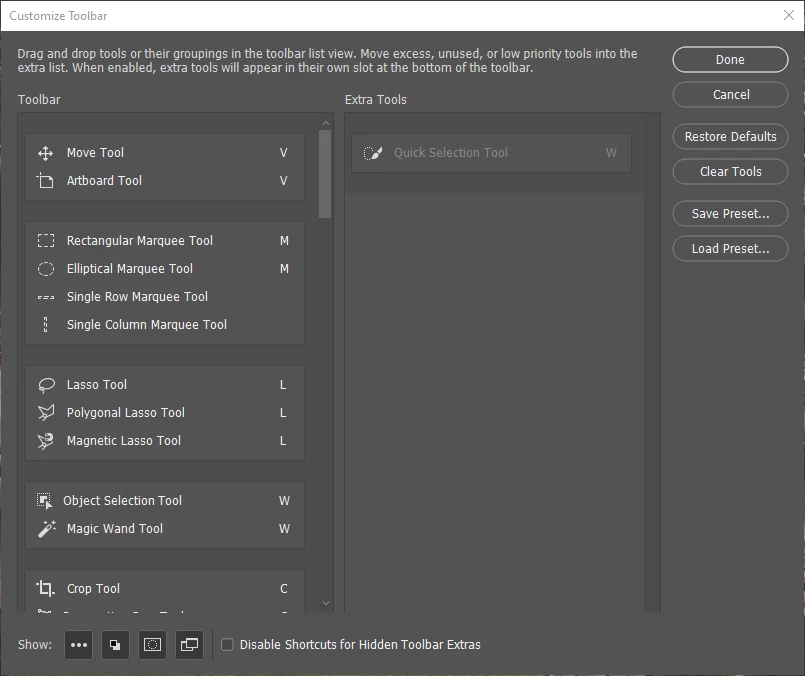
The quick selection tool seems to be greyed out in the extra tools region. If this is the problem, how do I fix it?
Dieses Thema wurde für Antworten geschlossen.
Beste Antwort von c.pfaffenbichler

»Extra Tools« is where the Tools are listed that have been removed from »Toolbar«. 

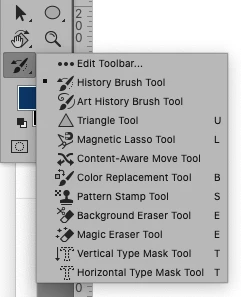
You should still be able to select it via the button with the three dots … 


2 Antworten

JJMack
Community Expert
Community Expert
February 3, 2021

That move out it of the tool bar if you display  the ... in the tool bar I believe the ... will show the extra tools You can move it out of the selection tool group  to the bar on its own.


JJMack
c.pfaffenbichler
Community Expert
Community Expert
February 3, 2021

»Extra Tools« is where the Tools are listed that have been removed from »Toolbar«. 

You should still be able to select it via the button with the three dots … 


RichardJB
Participant
February 3, 2021

Thanks guys!  I now see how it works.

RjB