
Participant
February 19, 2016
Answered

mixer brush tool missing in Photoshop CC 2015

  • February 19, 2016
  • 2 replies
  • 22149 views

Does the Mixer Brush or the Color Replacement Tool not exist on my "teacher's" version of PS CC?  I click on the brush tool in the tool panel and only the Brush tool and the Pencil tool appear...no Mixer Brush.  Do I have some cheapo version or do I need to load up something?
    This topic has been closed for replies.
    Correct answer Akash Sharma

    Hi mw,

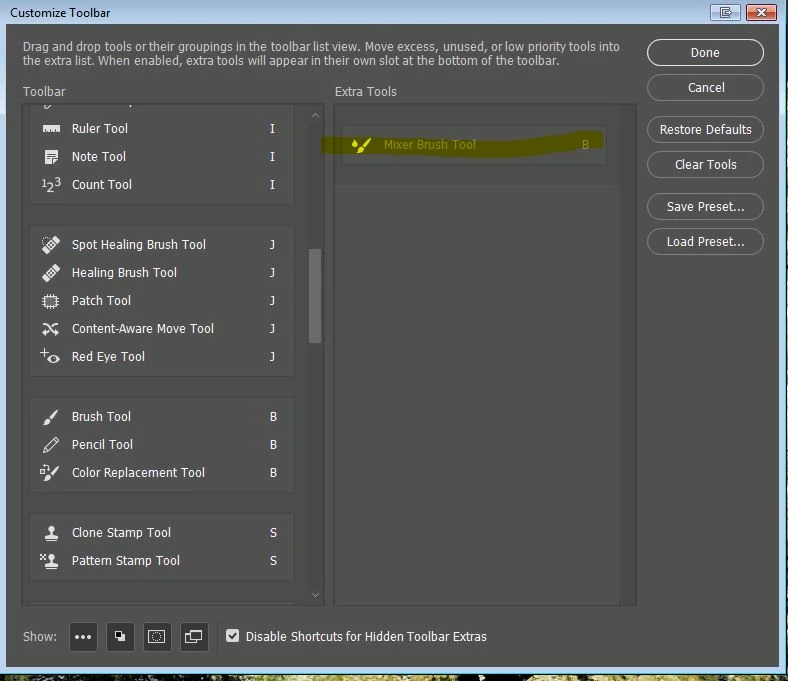
    Do you have the Mixer brush Tool  listed in the Extra Tools (Accessible from Edit>>Toolbar)?

    If so either move it back to Toolbar or click on Edit Toolbar >> Restore Defaults.

    Restart the Photoshop and check if you do see the Mixer Brush Tool now.

    Let us know if that helps.

    Regards,

    Akash

    2 replies

    Participant
    January 6, 2018

    Thanks for that answer - fixed my problem!

    Akash Sharma
    Akash SharmaCorrect answer
    Legend
    February 19, 2016

    Hi mw,

    Do you have the Mixer brush Tool  listed in the Extra Tools (Accessible from Edit>>Toolbar)?

    If so either move it back to Toolbar or click on Edit Toolbar >> Restore Defaults.

    Restart the Photoshop and check if you do see the Mixer Brush Tool now.

    Let us know if that helps.

    Regards,

    Akash