
Laethageal
Participating Frequently
March 3, 2022
Answered

Modifying a gradient fill with a script

  • March 3, 2022
  • 1 reply
  • 2310 views

Hello,

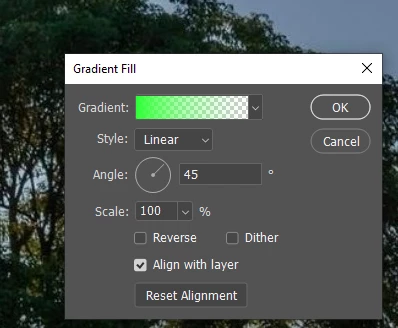
I'm looking to automate a process where I need to have a gradient fill layer modified. Is it possible to modify the Angle at which the linear gradient is applied. I know the values can go from 0-359 but is there a command to actually modify its value with one of the javascript command?  I couldn't find any directly related to a gradient angle. 

Thanks!


This topic has been closed for replies.
Correct answer Stephen Marsh

@Laethageal wrote:

How would I pick a layer in a particular group?


Various methods are explored here:


https://gist.github.com/MarshySwamp/229a0676666a44cdaa007da1cfddc0b7


1 reply

c.pfaffenbichler
Community Expert
Community Expert
March 3, 2022

Have you used ScriptingListener.plugin to record the operation as AM code? 

// 2022, use it at your own risk;
changeAngleOfGradientLayer (30);
function changeAngleOfGradientLayer (theAngle) {
try {
var idset = stringIDToTypeID( "set" );
    var desc5 = new ActionDescriptor();
    var idnull = stringIDToTypeID( "null" );
        var ref1 = new ActionReference();
        ref1.putEnumerated(stringIDToTypeID( "contentLayer" ), stringIDToTypeID( "ordinal" ), stringIDToTypeID( "targetEnum" ));
    desc5.putReference( idnull, ref1 );
    var idto = stringIDToTypeID( "to" );
        var desc6 = new ActionDescriptor();
        var idgradientsInterpolationMethod = stringIDToTypeID( "gradientsInterpolationMethod" );
        var idgradientInterpolationMethodType = stringIDToTypeID( "gradientInterpolationMethodType" );
        var idperceptual = stringIDToTypeID( "perceptual" );
        desc6.putEnumerated( idgradientsInterpolationMethod, idgradientInterpolationMethodType, idperceptual );
        var idangle = stringIDToTypeID( "angle" );
        var idangleUnit = stringIDToTypeID( "angleUnit" );
        desc6.putUnitDouble( idangle, idangleUnit, theAngle );
        var idtype = stringIDToTypeID( "type" );
        var idgradientType = stringIDToTypeID( "gradientType" );
        var idlinear = stringIDToTypeID( "linear" );
        desc6.putEnumerated( idtype, idgradientType, idlinear );
        var idgradient = stringIDToTypeID( "gradient" );
    var idgradientLayer = stringIDToTypeID( "gradientLayer" );
    desc5.putObject( idto, idgradientLayer, desc6 );
executeAction( idset, desc5, DialogModes.NO );
} catch (e) {}
};


Laethageal
Participating Frequently
March 18, 2022

Sorry for the slow reply, new job came in and had to put my project on hold for a few days.

Also, thanks for the tip. I'm no javascript coder and still hardly get by modifying some basic commands on premade script to try and fit what I'm looking for, mostly by addition of some if/else check. I wasn't expecting something so complex 😉

From what I understand, this is the code that scriptlistener gave you when changing a gradient?
How would I pick a layer in a particular group?


Chuck Uebele
Community Expert
Community Expert
March 18, 2022

Lots of ways to pick a layer: by name, by placement in the group, by type, or by index. What way are you looking for?