Em-Aner
Participant
February 26, 2022
Question

Moniteur resolution

  • February 26, 2022
  • 4 replies
  • 260 views

Bonjour, je travaille avec 2 moniteurs  de résolution différentes. 1- 2500x1440   2- 1980x1080. Lorsque je bouge certains panneaux du moniteur 1 vers le moniteur 2 ils ne s'affichent pas corectement. Voici ce qui est visible sur le moniteur 2
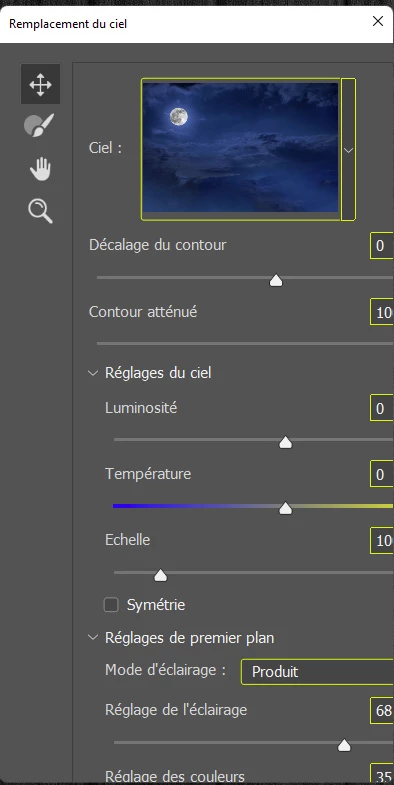
 

This topic has been closed for replies.

4 replies

Community Manager
March 2, 2022

Hello, hope you are well. Does moving the panel back to the  original monitor correct the issue? Also, does this occur for other panels or just Sky Replacement? 

Dramenon
Inspiring
March 1, 2022

To help solve the issue in Photoshop, select Help > System Info.

  1. In the System Info dialog, click Copy.
  2. Attach or copy the info here to this thread.
/end of line/
Em-Aner
Em-AnerAuthor
Participant
February 27, 2022
Bonjour
C'est une solution de facilité mais cela ne fonctionne pas. Le problème se
pose pour le remplacement du ciel mais pas pour les filtres neural par
exemple
Cordialement
Legend
February 27, 2022

Let's make sure we're in a default state and there are no stale setting somewhere:
Restore your preferences using this manual method:
https://helpx.adobe.com/photoshop/using/preferences.html#Manually
Does it work correctly?
If that doesn't solve it, you can quit Photoshop and put the Settings folder back.
If it does solve the problem, I would like to get the folder of settings to try and figure out what is bad with them.