
Answered
Move snapshop in layer
I would like to move the instantaneous levels
in the layers panel
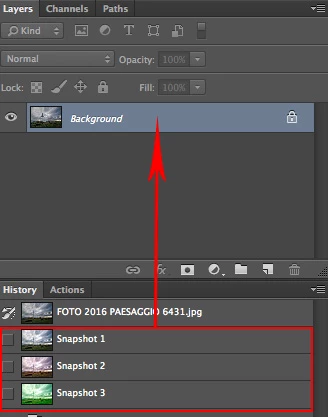
there is a way to do it.
I would like to move the instantaneous levels
in the layers panel
there is a way to do it.
Hi Sahil.Chawla
Never say never.
(This is the scripting forum  )
)
one possible way to go (AM-Code is your friend):
count the snapshots
create a new snapshot
go to the last snapshot (before the new created one)
select all
copy
// if necessary add a new layer at the top
paste
create a new snapshot (overwrite the last one or remove the last one and create a new one)
go to the last snapshot (before the new created one)
select all
copy
// if necessary add a new layer at the top
paste
and so on …
Have fun
Already have an account? Login
Enter your E-mail address. We'll send you an e-mail with instructions to reset your password.
 AdChoices